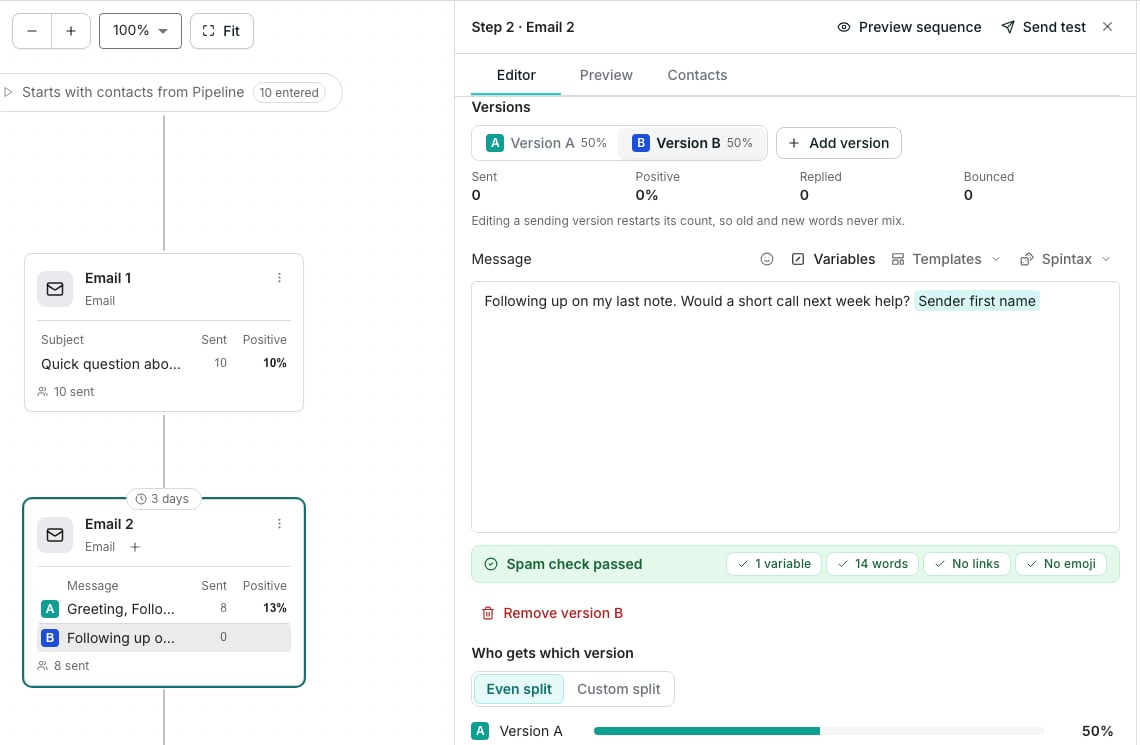
A follow-up email with a second version added, open in the step panel.
Run a test
1
Add a version
Open the step on a sequence’s Builder and click Add version under Versions, or hover a message card and click the + beside its kind, such as Email. Version A is the step’s own words, and a step holds up to four versions.
2
Write it
The new version starts empty. Write its subject and message, or its prompt on a step the agent writes.
3
Choose who gets which version
Under Who gets which version, keep Even split, or pick Custom split and drag each slider or type its percent. Version A gets the rest, so the split always adds up to 100%. A version at 0% gets no one.
Read the result
Every message card shows a table of its versions, with how many each was sent to and its share of positive replies. Click a row to open that version. A tested card says Too early until the numbers can tell the versions apart, then which one is winning, such as B is winning. Versions are judged on positive replies. Analytics shows the same on its Steps table. Click the arrow beside a tested step’s name for each version’s own row.Send the winner to everyone
Click Send B to everyone in the step’s callout, or on its row in Analytics. The winning words become the step’s own and the test ends, so the card says Kept B. Undo brings every version and its numbers back, until you change the step again.Good to know
When does a test name a winner?
When does a test name a winner?
Once it is 95% sure one version gets more positive replies, and every version has been sent at least 40 times. Until then the callout says it is too early to tell, and when it can, about how many more sends it needs.
Why does a version get no one?
Why does a version get no one?
A version gets no one at 0%, until it has words, or until it has a subject on an email that starts a thread. The other versions share its contacts until then.
What happens to the numbers when I edit a version that is sending?
What happens to the numbers when I edit a version that is sending?
Its count starts again from the edit, so old and new wording never mix in one number.
Which email gets a reply?
Which email gets a reply?
The last email the contact got before replying, as on the Steps table in Analytics. So a reply after a follow-up counts for the follow-up’s version, not the first email’s.
What does the step panel show for a version?
What does the step panel show for a version?
The open version’s Sent, Positive, Replied, and Bounced numbers, or Accepted on a connection request. The callout above the tabs says how much more one version gets, or about how many more sends the test needs.
How do I take a version off?
How do I take a version off?
Open it and click Remove version under its message. A version with words asks first, since they are deleted with it. Removing the last one ends the test.
Can I preview or test send a version?
Can I preview or test send a version?
Yes. The Preview tab, Send test, and the spam check all follow the version open in the panel.
Why is Send B to everyone greyed out?
Why is Send B to everyone greyed out?
Your latest edits are still saving, wait in Review changes, or wait for Update. Hover the button to see which. Once they are saved, it works.
Can the AI Assistant run a test for me?
Can the AI Assistant run a test for me?
Yes. Ask it to add or change a version, change the split, say how a test is doing, send a version to everyone, or undo that.
Next steps
Email steps
Write the subject and message a step sends.
Sequence analytics
See how each step and sender is doing.