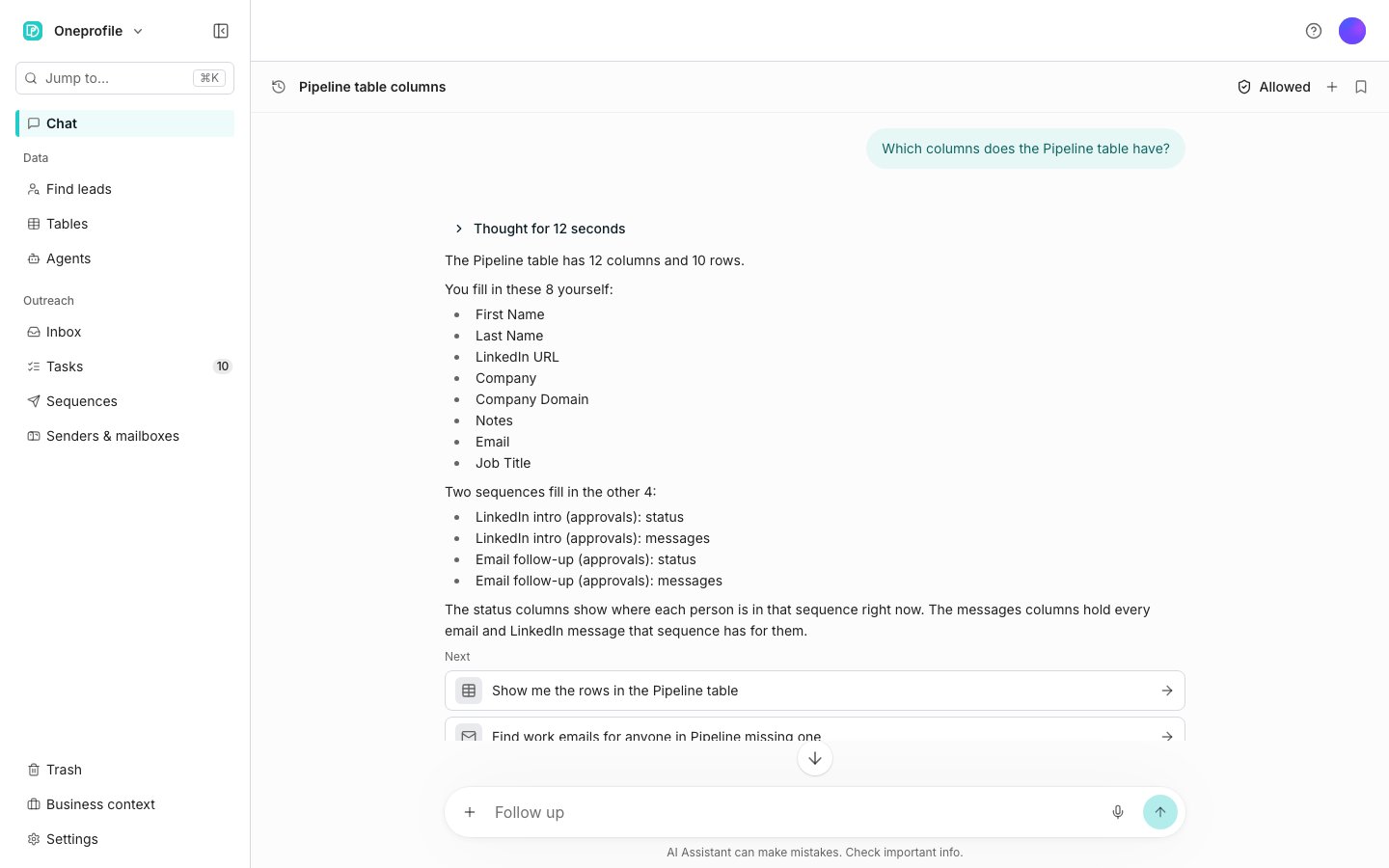
The Chat page, with one conversation open.
Ask for the work
Ask in your own words. It can:- Search for people and companies, and say how many match.
- Create a table from a search and add the rows.
- Search the rows of a table and answer from them.
- Read a column’s value distribution: which values are most common, and how many cells are empty.
- Inspect one column of a CSV or Excel file you attach, before it becomes a table.
- Read every row and sheet of a file you attach, including a title row and cell comments.
- Read a PDF you attach, page by page, and make a table of the table it holds, such as an attendee list.
- Add columns and run them, including AI columns and enrichments such as work emails.
- Build a sequence with its steps, audience, and sender, and launch it. Ask for emails and follow-ups and it builds a draft sequence, with your wishes for the writing on the same card. It can start from the Email campaign or the Email and LinkedIn campaign.
- Give a sequence’s steps the names you use when you ask. Without names from you, they are Opener, New angle, and Break-up.
- Write the emails for up to ten contacts the sequence can reach once it is built, and name anyone it left out and why. Each contact’s link opens the sequence’s AI writing tab on those same emails, ready for Looks good. A thread you do not rate Looks good is written again when it sends.
- Rewrite a contact’s thread from your note, keep or discard the rewrite, and move on to the next contact, as the AI writing tab does.
- Find work emails for a sequence’s contacts who have none. It waits on its own card.
- Look up how something works in the help, and what it costs before it runs.
- Set any filter the Find leads page offers, on a new search or on the search behind a table.
Open Chat
Chat sits alone at the top of the sidebar, above Data. The command palette finds it too: press Cmd+K, or Ctrl+K on Windows and Linux. Chat opens on the conversation itself. The clock at the top left, Show conversations, opens the list of the others beside it, and Hide conversations shuts it again.Use it on any page
The same AI Assistant is docked on the right of every page, and it behaves the same everywhere. It knows which page you have open, so “this table” means the one in front of you. Hide, in the panel’s AI Assistant actions menu, folds it into a strip whose one button, AI Assistant, brings it back. While it works, each step appears as it finishes, and Stop ends a reply still working.Find a conversation
The list holds every conversation you have had, wherever you were when you had it. Search conversations looks through their names and what was said. A row’s menu offers Pin, Rename, and Delete, and pinned rows stay at the top. Every conversation in the list opens live, so you can pick any of them up where you left off.Delete a conversation
Delete asks once, then withdraws any action still waiting for Approve in it. Anything you already approved stays.Good to know
What can I ask it to do on a table?
What can I ask it to do on a table?
- Read rows that match “or” conditions and bracketed groups.
- Run several columns at once, on the rows you picked.
- Add rows above or below a row, and make a column wider.
- Name the colours columns are tinted with, for the whole workspace.
- Say what depends on a column, then delete it and point what used it at another column.
- Link each row to its row in another table and bring back its values, change that link, or count the rows pointing at each row.
- Copy a view and move it among the views. Add or remove one condition, or hide and show columns, and the rest of the view stays as it is.
- Explain a cell: the prompt the AI saw, and what its credits paid for.
- Read a table out as CSV in the conversation, filtered and sorted, or only the rows you picked.
- Refresh a table from its connected tool by fetching every record again, and remove rows whose records were deleted there.
- Change the time of a table’s refresh schedule or its lead search schedule, or pause and resume one. The rest of the schedule stays as it is.
What can I ask it to change on a column?
What can I ask it to change on a column?
- Make a column wait after its condition is met, or stop it running automatically.
- Refresh a column every so many hours, or stop it refreshing.
- Give an AI column the whole row, or a JSON output schema.
- Start an AI column’s research from a URL column, and keep it on that site.
- Stop a column using its agent, keeping a copy of the agent’s settings on the column.
- Put a split field into a column you already have. That replaces what the column holds, so it always asks.
- Run a column group only when a condition holds.
- Change an export column’s settings, such as the update mode, retries, timeout, or requests per minute, and a lookup column’s settings. Editing one never runs it.
What can I ask it to do with lead searches?
What can I ask it to do with lead searches?
- Run a saved search again, or one from the search history. Counting it again is free, and adding its rows to a new table asks first with the price.
- Read the filters a saved search carries.
- Price a buying signal search without charging for what the signal already brings back.
What can I ask it to do with sequences and the outbound agent?
What can I ask it to do with sequences and the outbound agent?
- Show one contact’s history in a sequence, and say why someone is not being contacted.
- Say how many contacts are still starting after a launch, and how many of their tasks wait for approval.
- Swap a sequence’s audience table, keeping the contacts already in it where they are or starting them fresh.
- Choose which columns hold the email address, the LinkedIn URL, and the company domain.
- Send a sequence in each sender’s timezone, or hold every sender to one timezone’s hours.
- Stop, pause, or remove contacts by filter: bounced, opted out, out of office, added since a date, or at one company.
- Build a sequence for only the rows you picked.
- Move a sequence to Trash, list the sequences in Trash, restore one, or delete one forever.
- Add steps where you say. When the sequence branches, it first asks which path or end gets them, unless you named the step they follow.
- Name the steps it adds in your words, or rename a step. It never gives two steps the same name.
- Put steps on a connection request’s Connected or Not accepted branch, give already-connected contacts their own branch, or change how long it waits. A request it adds comes with a withdraw on Not accepted, as on the canvas.
- Send a follow-up in the thread of an earlier email in the same sequence.
- Set the prompt the agent writes replies from.
- Preview a step as it would send from a mailbox you choose.
- Mark a message Needs work with your reason, including one already sent, then save, reword, or undo the learning it proposes. Each learning is for This sequence or All sequences, and it can move one between them.
- List what the agent learned, including the learnings for all sequences, and undo a learning.
- Say what changed between two versions of the agent.
- Rank your senders with every rate side by side, and read older activity.
What can I ask it to do with agents and business context?
What can I ask it to do with agents and business context?
- Duplicate an agent, or save it as a template.
- Choose which actions an agent may take without asking. That change always asks you first.
- Show an agent’s price per row at each effort level.
- Add inputs while making an agent from a template.
- Read a Preview example’s reasoning and the sources it used.
- Mark an answer Needs work with your reason, and list, reword, or delete an agent’s learnings. Marking Needs work always asks you first.
- Add MCP servers to an agent or remove them, and change one header on a server while keeping the others.
- Empty one section of your business context when you say so, leaving every other section alone.
What can I ask it to do with senders, mailboxes, and LinkedIn?
What can I ask it to do with senders, mailboxes, and LinkedIn?
- Show a sender’s LinkedIn queue, and cancel steps in it.
- Show what went out as a sender, with who approved each email or LinkedIn step or whether it went automatically, and what was rejected in Tasks.
- Say why a sender’s LinkedIn is waiting and until when, such as the time between steps, a daily limit, or the sending window.
- Set a sender’s timezone, or clear it so Oneprofile detects it again.
- Send a test LinkedIn message, or withdraw a connection request.
- Change one of a sender’s daily LinkedIn limits, such as checks of sent connection requests, checks of new connections, inbox checks, or conversation reads. The other limits stay as they are.
- Add mailboxes to a sender or remove them.
- Delete several senders at once. It refuses while a sequence uses one, and names the sequences.
- Recheck the mailboxes you name, and say which mailboxes sent on a given day.
- Say how far an InboxKit mailbox has got in its setup.
What can I ask it to do in the Inbox, Tasks, and alerts?
What can I ask it to do in the Inbox, Tasks, and alerts?
- Filter replies by sender, or leave out a sequence, a mailbox, or a sender.
- Mark conversations done, or take the mark off.
- Mark the contacts of several conversations as do not contact at once.
- Add labels to a conversation or remove them, keeping its other labels, and give a label an icon.
- Save an inbox view that keeps unread only, a received within period, a sender, and what it leaves out.
- Narrow the approval queue to one kind, such as the connection requests waiting on you. Each task shows the message’s subject and the contact’s title and company.
- Approve or reject the tasks waiting on you, one or many, including every message the agent scored above a number. A card asks first, every time.
- Say when approved steps will run, and what holds them back, such as no browser open for the sender.
- List the LinkedIn steps that failed, with the reason for each, and retry them.
- Stop the suggestion to set a cooldown.
- Turn your own email alerts on or off by name, leaving the rest as they are. An alert sent to someone else can only go to a member of the workspace.
What can I ask it to do with connections and my account?
What can I ask it to do with connections and my account?
- Reconnect a connection, keeping its environment, region, or login domain.
- Check every connection except the ones you name.
- Say which connections sync a given kind of record, such as contacts or deals.
- In the affiliate program, say whether your commission is a launch offer and on what terms, and page back through older invoices and referrals.
Which files can I attach?
Which files can I attach?
What does it leave to the page?
What does it leave to the page?
- Moving a contact to another sequence. See Choose the audience.
- Remapping the inputs of a column already deployed from an agent.
- Exporting to Excel, or saving a file. See Export a file.
- Choosing the sheet, overriding columns, or capping the rows when a file you attach becomes a table.
- Setting a start date on a search schedule.
- Creating API keys.
- Changing its own approval settings, in Settings under AI Assistant.
What can it change, and what does it ask first?
What can it change, and what does it ask first?
Will an edit change anything I did not mention?
Will an edit change anything I did not mention?
Which changes always ask, even when I allowed them?
Which changes always ask, even when I allowed them?
- Sending anything.
- Removing anything, including an AI column’s outputs or an entry on the do-not-contact list.
- Stopping contacts in a sequence, or adding contacts to one that is running.
- Loosening what waits for a person: a sender’s send mode, resuming a paused sender, LinkedIn steps set to run automatically, or a sequence’s approval set to follow the sender.
- Letting an agent act without asking.
- Rewriting your business context from your website, or rewriting a reference document’s summary.
- Disconnecting a connected tool.
Why was a card I had not decided closed with a note?
Why was a card I had not decided closed with a note?
What happens after I approve a change?
What happens after I approve a change?
Where did the conversation list go?
Where did the conversation list go?
Can I make the AI Assistant wider?
Can I make the AI Assistant wider?
Which conversation does the panel open on?
Which conversation does the panel open on?
How much of the page does it know?
How much of the page does it know?
What does Stop do?
What does Stop do?
Who can see my conversations?
Who can see my conversations?
How long are conversations kept?
How long are conversations kept?
Is there a daily limit?
Is there a daily limit?
What does it do before a long job?
What does it do before a long job?
What does Chat know about my workspace?
What does Chat know about my workspace?
What happened to the assistants on Find leads, tables, and agents?
What happened to the assistants on Find leads, tables, and agents?