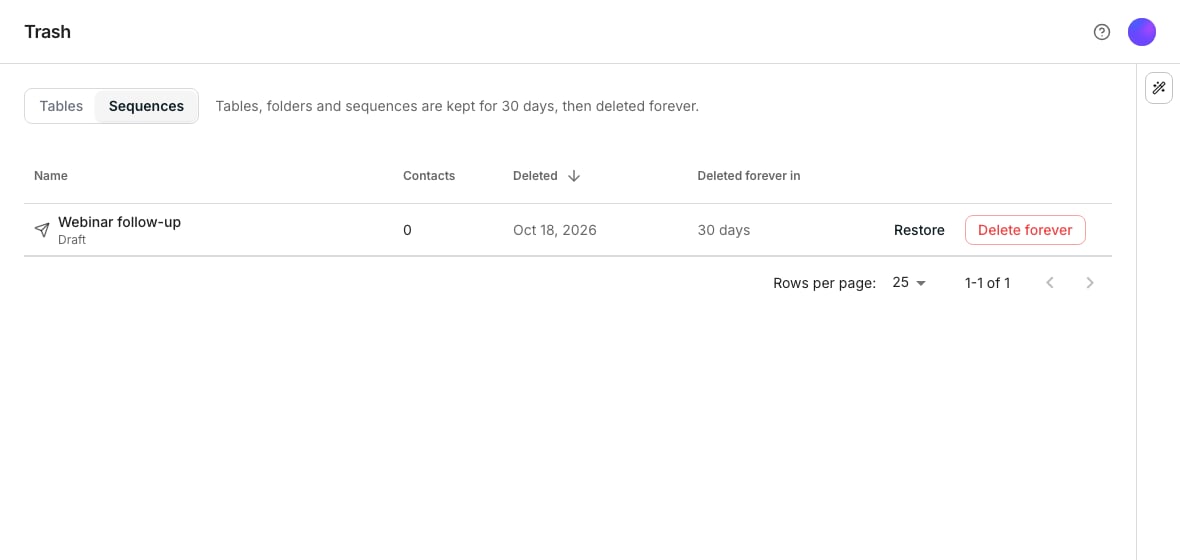
The Trash page on its Sequences list, holding one deleted draft.
Find something you deleted
Open Trash from the sidebar, choose Tables or Sequences at the top, and search by name above the list. Each row says when it was deleted and how many days remain before it is gone for good. A table shows its row count, a folder how many tables went with it, and a sequence its contacts.Restore a table or folder
Restore returns a table to your table list, with every column, row and cell it had. A folder takes every folder and table in it to Trash, and restoring it brings all of them back where they were.Restore a sequence
Moving a sequence to Trash pauses it if it was running, and stops its contacts so another sequence can take them. Its status and messages columns stay on its audience table. Restore brings a launched sequence back paused, and nothing sends until you resume it. Its contacts go back to the step they were on, except those another sequence took meanwhile. A draft comes back a draft, and a finished sequence comes back finished.Delete forever
Delete forever, in a row’s ⋯ menu, removes it permanently, after a confirmation that names it and warns that this cannot be undone. On a folder, it removes the tables in it too. On a sequence with an audience table, the confirmation also names the table that loses its status and messages columns.Good to know
How long does something stay in Trash?
How long does something stay in Trash?
Tables, folders and sequences in Trash are kept for 30 days. After that they are deleted forever. A folder is kept just as long, with its tables.
Can another sequence take the contacts of a sequence in Trash?
Can another sequence take the contacts of a sequence in Trash?
Yes, at once. If you restore the old sequence, each contact another sequence holds by then reads Stopped in Trash there. One contacted inside your cooldown is stopped by the new sequence, as anyone would be.
Which contacts stay stopped when I restore a sequence?
Which contacts stay stopped when I restore a sequence?
Those another sequence holds now, those who replied, bounced or unsubscribed meanwhile, and those whose row left the audience. Everyone else goes back to the step they were on. The toast says how many another sequence kept. A draft holds nobody, so a restored draft takes every contact back.
What happens when I open a sequence that is in Trash?
What happens when I open a sequence that is in Trash?
Its page says it is in Trash, with Restore to bring it back there and Open Trash to see the rest. A link from the Inbox, an AI Assistant card or a bookmark lands there.
Are replies to a sequence in Trash still recorded?
Are replies to a sequence in Trash still recorded?
Yes. Replies, bounces and unsubscribes are recorded and reach your Inbox as usual. Its agent does not answer them while it is in Trash: Draft with AI still writes a reply for you to review, and nothing sends on its own. An email that was already on its way when you moved the sequence still counts as sent.
What happens to a sequence's tasks in Trash?
What happens to a sequence's tasks in Trash?
Its open tasks are withdrawn, approved ones that have not gone out included, and its queued LinkedIn steps are taken back. A reply you typed in the Inbox still sends. After a restore, each contact’s step asks again once you resume the sequence.
Why will a sequence or table not restore?
Why will a sequence or table not restore?
Another sequence or table took its name while it was in Trash, and two cannot share a name. Rename the other one, then restore this one.
Why did one table stay in Trash when I restored its folder?
Why did one table stay in Trash when I restored its folder?
Another table took its name while it was in Trash. Rename the other table, then restore this one from Trash on its own. It comes back into its folder.
Where does a restored table or folder go?
Where does a restored table or folder go?
Back into the folder it was in. If that folder is in Trash too, or gone for good, it comes back at the top of your table list.
Why does the list show fewer columns when it is narrow?
Why does the list show fewer columns when it is narrow?
A narrow list drops the date deleted and the row or contact count. The name, the days left, Restore and the ⋯ menu always stay.
Can I sort or search the Trash lists?
Can I sort or search the Trash lists?
Yes. Each list opens on what was deleted last; click Name or Deleted to sort it. The search box finds a table, folder or sequence by part of its name.
Can I restore or delete more than one at a time?
Can I restore or delete more than one at a time?
Tables and folders, yes. Tick their rows, or the header checkbox for the page, then click Restore or Delete forever in the bar. When more match than the page shows, Select all in the bar reaches the rest. Sequences are restored or deleted one row at a time.
Is there another way to undo a delete?
Is there another way to undo a delete?
Yes. The toast that says something moved to Trash carries Undo for a few seconds. Undo on a running sequence also resumes it. Past that, Trash is where you find it.
Does every deleted sequence go to Trash?
Does every deleted sequence go to Trash?
Every sequence you move to Trash does. A new sequence you leave without changing anything is discarded instead, since there is nothing in it to keep.
Next steps
Create a table
Start a new one while an old one sits in Trash.
Table settings
Move a table to Trash from its own settings panel.
Build a sequence
Move a sequence to Trash from its actions menu.