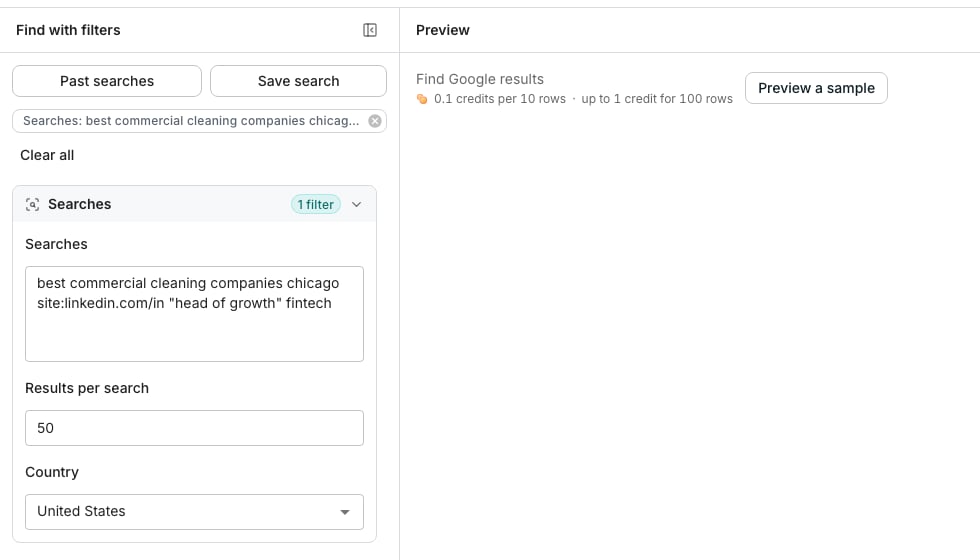
Find Google results, with two searches typed and priced.
Write the searches
Open Find Google results and paste your searches, one per line. Write each one exactly as you would type it into Google. Operators work and cost the same as a plain search.site:linkedin.com/in "head of growth" fintech finds LinkedIn profiles, and best commercial cleaning companies chicago finds companies and the lists that rank them.
Pick how many results each search adds, 50 by default. Pick the country the searches run from, the United States by default.
Preview and save the results
Click Preview a sample to see five results from the first search, with the search, rank and title shown. Click Continue, then choose Save to a new table or Save to an existing table. The panel that opens shows the most the results can cost before anything is added. Each 10 results added cost 0.1 credit, so a search of 50 results costs at most 0.5 credit.Good to know
What does a row carry?
What does a row carry?
The search that found the result, its rank on Google, the title, the link, the domain and the snippet Google shows under it. A date is added when Google prints one, such as “3 days ago”.
How many results does one search add?
How many results does one search add?
Up to the number you pick, from 10 to 300. A search stops sooner when Google runs out of results. Most searches run out near 100, while LinkedIn searches with site: often go further.
Which results are added first?
Which results are added first?
The top ones, in Google’s own order. A search of 50 results adds the first 50 Google shows.
How many searches can one table take?
How many searches can one table take?
Up to 100 searches at once. Blank lines and searches you typed twice are dropped.
Why does the same page appear on two rows?
Why does the same page appear on two rows?
Two of your searches found it, and each row says which search did. A link Google repeats further down one search’s own results is added once.
What do I pay for?
What do I pay for?
Only the results added to the table: 0.1 credit for every 10. The search itself and the preview are free.There is no count before you add rows, because counting would mean buying the results. The price shown before you add is the most it can cost.
Which country do the searches run from?
Which country do the searches run from?
The one you pick, the United States by default. Google ranks results for searchers in that country, so the same search can return different pages elsewhere.
Why is the Domain column blank on some rows?
Why is the Domain column blank on some rows?
The result is on a platform such as LinkedIn or a directory, rather than a company’s own site. The URL column still holds the page.
Can I enrich the results?
Can I enrich the results?
Yes, and it is optional. Enrich company works from the Domain column, so it skips rows where that column is blank. See Choose what to enrich.
Can the searches run again into the same table?
Can the searches run again into the same table?
Yes, like any search behind a table. Results the table already holds are updated rather than added twice, and only new results are charged. See Saved searches.
Next steps
Choose what to enrich
Pick the details to fill in before the rows are added.
Backlinks
List the sites that link to a domain you name.