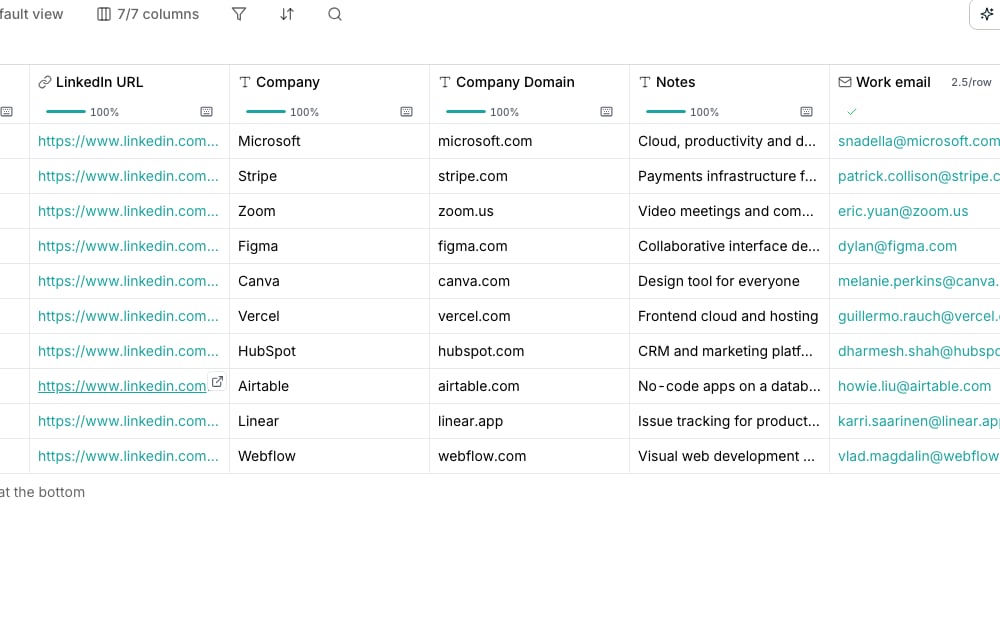
A Find work email column's results in the grid.
Find an address
Find work email checks a person’s name and company against multiple sources until one confirms an address. It returns the address alone; it never claims the mailbox will accept mail.Find a personal address
Find personal email returns the private inbox behind a profile. Feed it a LinkedIn URL, or a work email address you already have.Check whether it is deliverable
Verify email looks up one address and returns a Deliverability verdict: valid, risky, catch-all, invalid, disposable or unknown.Find a phone number
Find phone number returns a direct or mobile number. Feed it a LinkedIn URL, or a first name, last name and company. There is no matching check for phone, so a number comes back as found or not at all.Good to know
What does a catch-all verdict mean?
What does a catch-all verdict mean?
The domain accepts mail sent to almost any address at it, so it cannot confirm this particular one is real. Treat it as a soft yes rather than a confirmed address.To ask another verifier for a definite answer, switch on Check catch-alls with a second verifier in the column editor. It is off by default. A row it settles costs a second check.
Why is a found email marked Low confidence?
Why is a found email marked Low confidence?
The address is at a different domain from the person’s company, often a past employer or a personal inbox. Right-click the cell and choose View run to see the domain. Check the address before you send to it.
What does unknown mean?
What does unknown mean?
None of the sources checked could reach a verdict, often because a mail server temporarily refused the check. Verify it again later rather than treating it as invalid.
What is the difference between a work and a personal email?
What is the difference between a work and a personal email?
A work address is the mailbox at someone’s employer, found from their name and company. A personal address is the private inbox behind their profile, found from a LinkedIn URL or a work address.
Does finding an address also verify it?
Does finding an address also verify it?
No. Finding an address checks multiple sources for a match. Verifying deliverability is a separate action, with its own column and its own cost.
Can I chain the two together?
Can I chain the two together?
Yes. Bind Verify email’s input to the column Find work email fills, so a new row runs both, one after the other.
Why can I verify an email but not a phone number?
Why can I verify an email but not a phone number?
Nothing on the market checks a phone number the way a mail server checks an address, so there is no verify step to offer. Judge a number by whether it came back at all.
Which inputs give the best phone results?
Which inputs give the best phone results?
A LinkedIn URL is the strongest single input. Without one, give the first name, last name and company together, since a partial row is what most often comes back empty.
Next steps
What you can enrich
See every shelf in the enrichment catalog.
What enrichments cost
Read the cost before you run, and know what you’re charged for.
Improve your fill rate
What to feed a column when rows come back empty.