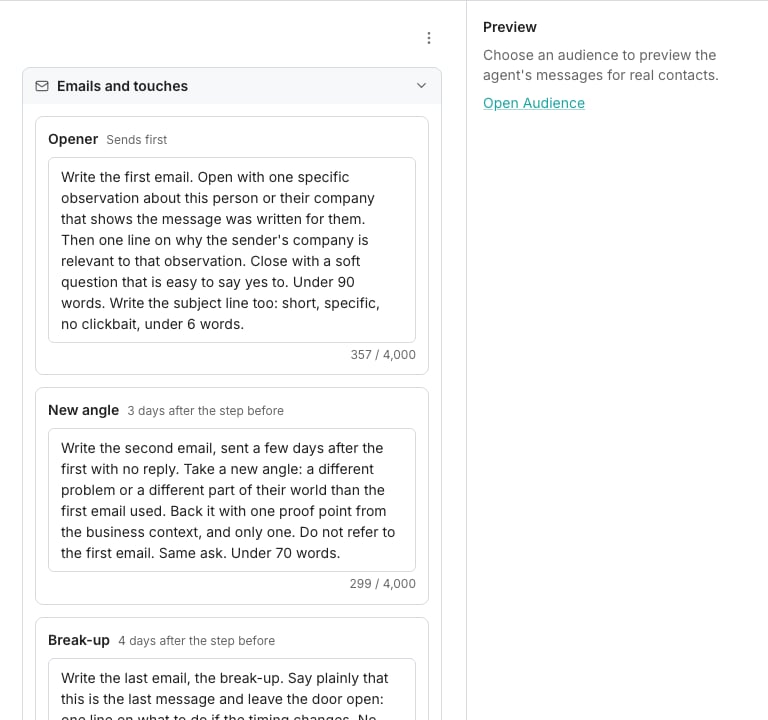
The Agent tab, holding one prompt per message.
Open the Agent tab
Open a sequence and click Agent. The tab holds everything the agent writes from, in the order you usually want it:- Emails and touches is one card per agent-written step, holding the prompt for that message. This is where you say what email 2 is for, not what it says word for word.
- What the agent knows shows your business context, the senders it writes as, and how much of each contact’s row it reads. Anything missing here is a link to where you fill it in.
- Personality picks the voice: Direct, Consultative, Bold, or Custom in your own words.
- Model and research picks how much thinking each message gets, and whether the first message to a contact may read the web about them first.
- Goal, call to action and replies sets what the whole sequence is for, the link it points at, the language, and the prompt behind its replies.
- Feedback and learning lists what people have rated and rewritten, and offers to improve the prompts from it.
Write a prompt for a step
A prompt says what the message is for. Leave the wording to the agent.- The cadence starts with three prompts written for you: a specific opener, a new angle, and a short break-up. Edit those rather than starting from nothing
- The agent writes the first subject in a thread and keeps later messages inside it, so follow-ups read as replies
- Type your own subject on a step and it uses yours instead
Preview it against a real contact
Once the sequence has an audience, the preview beside the prompts writes for a real contact.- Step through contacts with the arrows, or preview a later step to read how the thread goes
- Previews cost no credits, and the workspace has a daily cap on them
- Each result carries the agent’s confidence, a quality score from a second check, what it used, and anything a check flagged
Research
Research is off to start with.- Switch on Research each contact and the agent may read the web about a person and their company before the first message to them
- What it finds is kept for the rest of that conversation, so a contact is researched once and never again
- The line under the switch says what a message costs either way, and the researched price is charged only when the agent went and read something
What sends, and what waits for you
The sender’s send mode decides whether a message goes on its own. On Send when confident, the agent sends what it is confident in and hands you the rest in Tasks. Some things always wait for a person, whatever the mode:- A placeholder that never filled in, or an empty message
- A claim the agent could not ground in the row, the research or your context
- Too little known about the contact to write something honest
- A message that failed one of the safety checks
Teach it
The agent learns from what people do with its messages:- A rewrite on an approval card or an inbox draft becomes an example of what you wanted instead
- Thumbs up or down, with a comment, says why
- Improve prompts from feedback, in the tab’s actions menu, rewrites the prompts from the last of those and shows you the change before anything is saved
Good to know
Does it write my name into the email?
Does it write my name into the email?
No. The body ends with the ask, and your signature signs it. It uses your name, job title or booking link only where you put those variables yourself.
What does it read from the row?
What does it read from the row?
Every non-empty cell on the contact’s row, bounded so a huge row cannot crowd out the rest. Notes columns are worth filling: they are what a specific opener is usually made of.
Can it invent things?
Can it invent things?
It is told not to, and a second check reads every message against what it was allowed to use. Anything it cannot ground waits for a person instead of sending.
What happens to a message I pinned by hand?
What happens to a message I pinned by hand?
It stays. Pinned words are yours, and the agent does not write over them until you hand the contact back with Let the agent write it again.
Next steps
Email steps
Switch a step to the agent and write its prompt.
Senders
Decide what sends without you.
Tasks
Approve, edit or reject what waits for a person.
Business context
Tell the agent about your company, in one place for every sequence.