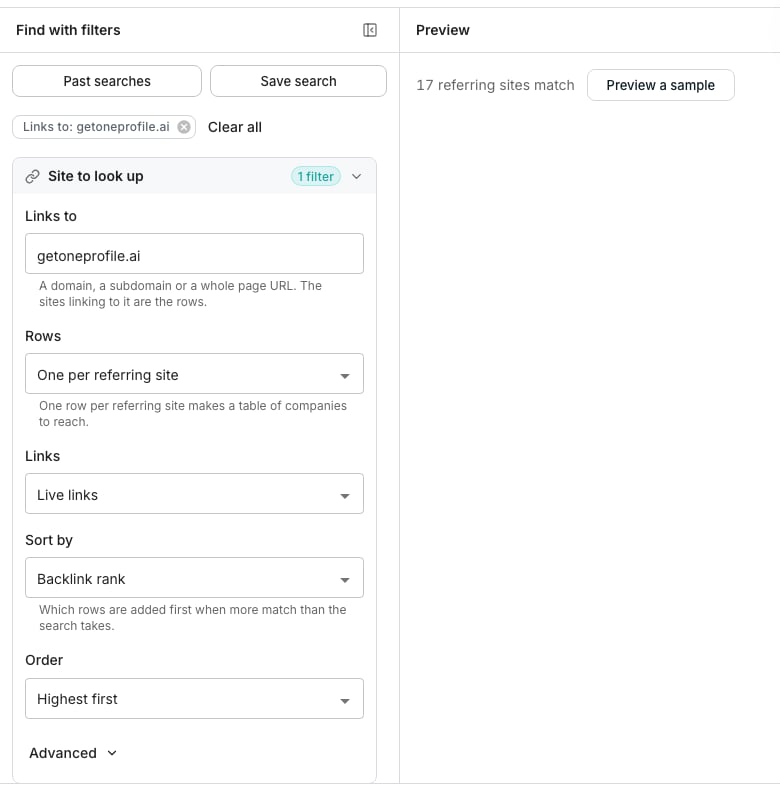
Sites linking to a domain, with a target typed and counted.
Build a search
Open Sites linking to a domain and type a domain into Links to, such as competitor.com. A subdomain or a whole page URL works as well. Rows decides what one row is. One per referring site is the default and gives you a list of companies to reach. Every link gives every link, several per site. Narrow the rows under the four groups below. They cover the referring site, the referring page, the link itself and the page it points at. Each group folds its rarer filters under Advanced.Preview and save the matches
Click Preview a sample to see the referring site, page title and anchor text of five matches. Click Continue, then choose Save to a new table or Save to an existing table. The Enrich these rows panel shows what a row costs before anything is added.Good to know
What does a row carry?
What does a row carry?
The referring site and its domain, the page the link is on, the anchor text, the linked page, the link type and whether it passes rank. Then the three ranks, the spam score, the site type, its country and language, and when the link was first and last seen. Every other detail of the link stays on the row’s Backlink column.
Which links are counted?
Which links are counted?
Live links, by default. Links switches to lost links, or to both.
Which rows are added when more match than the search takes?
Which rows are added when more match than the search takes?
The best first. Rows are sorted by the rank the link passes unless you pick another attribute under Sort by, and the top of that order is what a table gets.
Why was my search refused for having too many filters?
Why was my search refused for having too many filters?
A search takes at most eight filter values at once, and every value in a list counts as one. Three referring sites and a country are four. Remove one and run it again.
What do the ranks mean?
What do the ranks mean?
Backlink rank is what the link passes to the site you named. Domain rank and page rank are the referring site’s and page’s own standing. All three read on a scale of 0 to 100 unless you switch Rank scale under Advanced.
Can I keep a few links per site instead of one?
Can I keep a few links per site instead of one?
Yes. Under Advanced, pick Keep a few links per and set Links to keep per value. That replaces the Rows choice.
Why is the Domain column blank on some rows?
Why is the Domain column blank on some rows?
The referring site is a platform host, such as a social network or a link aggregator, rather than a company of its own. The Referring domain column still names the site.
Can I check a named list of sites?
Can I check a named list of sites?
Yes. Put their hosts under Referring sites and the search only reads links from those sites, up to eight.
Next steps
Choose what to enrich
Pick the details to fill in before the rows are added.
People and companies
Search people and companies by who they are.