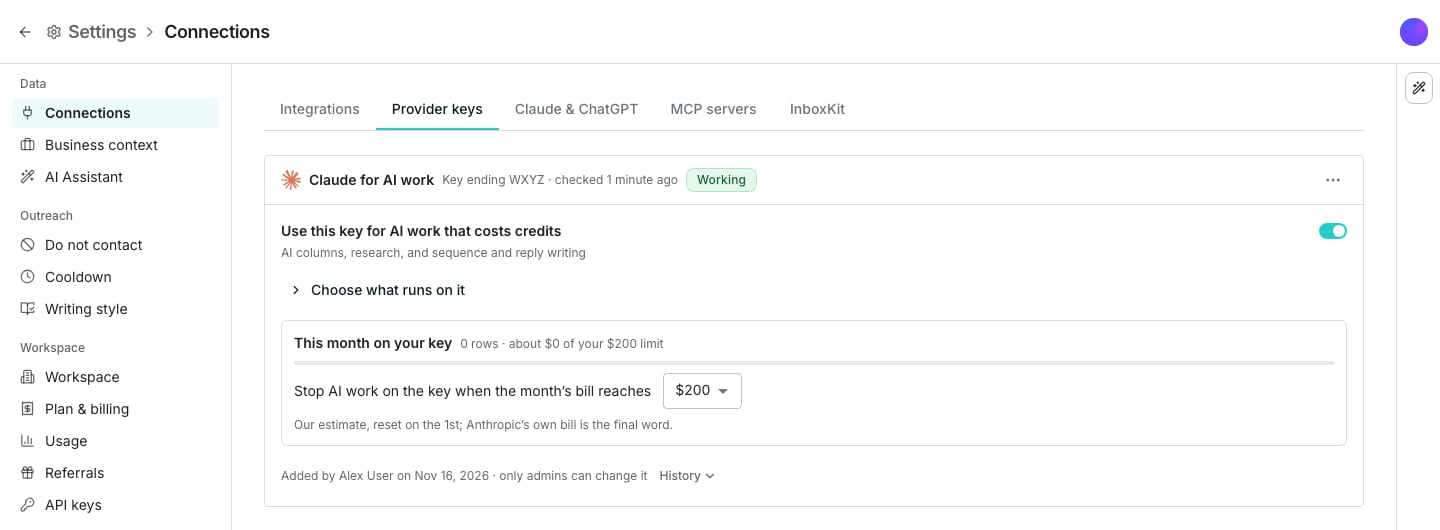
The Anthropic key for AI work card on Provider keys.
Connect your key
1
Open the card
Open Connections, click the Provider keys tab, then Connect your Anthropic key.
2
Make a key for Oneprofile
In the Anthropic Console, create a new key just for Oneprofile. Its spend then shows on its own line, and you can turn off just this key.
3
Paste and test it
Paste the key and click Test and connect. Anthropic is asked one short question before the key is saved.
Add more keys
Click Add another key to add up to 10 Anthropic keys. Each row or written step runs on one working key, picked at random. Each key’s row says what it carried this month, so you can match it to that key’s Anthropic bill. Its ⋯ menu offers Check again, Replace key, and Remove key.Choose what runs on it
Use this key for AI work that costs credits turns the key on or off. Open Choose what runs on it to switch AI columns, Research, and Sequence and reply writing apart. To run on credits for a while, turn Use this key for AI work that costs credits off. Turning it back on puts the work back on the saved key.Set a monthly limit
This month on your key shows our estimate of Anthropic’s bill across all keys. Work stops when it reaches your limit, $200 by default, and starts again when the month ends at midnight UTC.When the key stops
A refused key, or an Anthropic account out of credit, stops that key, and work moves to your other working keys. When every key has stopped, work stops and never moves to credits by itself. A run checks your keys before starting. A row the key stopped reads Anthropic key stopped and costs nothing: fix the key, then use Run failed rows.Good to know
What does a row on my key cost?
What does a row on my key cost?
The fee shown in the connect form, plus the web pages the row reads. A row on your key never costs more than the same row on credits.
What stays on credits?
What stays on credits?
The AI Assistant and small background jobs run on our Claude and stay free. Waterfall lookups keep their own providers and keys.
Who can change the key?
Who can change the key?
Workspace admins connect, replace, pause, and remove it, and change what runs on it. A member whose run a stopped key holds is told which admins to ask. History on the card shows who changed what, and when.
Which key paid for a row?
Which key paid for a row?
A row paid on a key names it by its last four characters in the row’s details, and each key’s row on the card says what it carried this month.
Who is told when the key stops?
Who is told when the key stops?
Everyone who gets Provider key stopped working emails, once per stop. The email names the key by its last four characters, and its button is the fix. A reached limit is told once a month, with the moment it lifts.
Why are big runs slower on my key?
Why are big runs slower on my key?
Anthropic keeps a new account slow until it raises the account’s limit. The card says so while it lasts. Anthropic sets the limit per account, so keys from different Anthropic accounts speed up big runs, while more keys from one account do not.
Which Claude models run on my key?
Which Claude models run on my key?
The same ones that run on credits. We pick them per job, as we do on our own account.
Can the AI Assistant add my key for me?
Can the AI Assistant add my key for me?
No. A key works like a password, so only you paste it, on this card. The AI Assistant can show how the key stands, check it, pause it, change what runs on it, and remove it once you approve.
Why can't I connect a key?
Why can't I connect a key?
Running Claude on your own key comes with paid plans, and only admins connect it.
Next steps
Provider keys
Add your own keys with the providers your waterfall columns ask.
Run columns
Run a column on some rows or all of them, and run failed rows again.