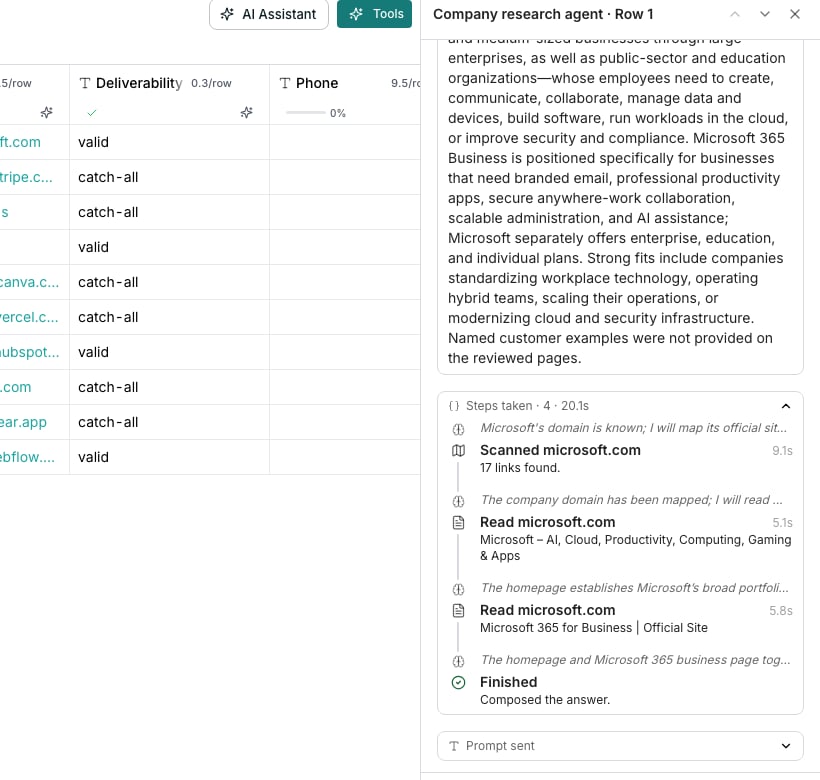
A cell's Steps taken panel, open on an agent run.
Open a run’s trail
Click a cell the agent filled in to open its drawer, then click Steps taken. That opens the timeline of everything the agent did for that answer.Read the trail
Each step names one move, in the order it happened:- Searched the web, with the query shown beneath it
- Read a page, naming the site once it resolves
- Scanned a site, mapping it before a crawl
- Crawled a site across more than one page
- Used a tool, naming which one and its arguments
- Looked up their work email, Read their LinkedIn profile or Looked up people at a company, when a lookup is on
- Finished, once it has enough to answer
See why it answered that way
A muted line above some steps is the model’s own reasoning for the move that follows, folded to one line until you click it. Below the whole trail, Reasoning explains why the value in the cell is the answer.Good to know
What does Answered without researching mean?
What does Answered without researching mean?
The agent had enough from what you gave it and skipped research entirely. Its Finished step still shows, so the trail is never empty.
What happens if the agent tries more than once on a row?
What happens if the agent tries more than once on a row?
Each retry gets its own attempt heading above its trail, so you can tell which steps belong to which try.
What happens if the research runs out of time?
What happens if the research runs out of time?
A cell that researches the web has its own time limit. When it runs out, the cell says the research ran out of time before the answer was written, and the trail keeps every step recorded up to that point.
What does a step in red mean?
What does a step in red mean?
That move did not work. It is named for what the agent was trying, such as “Searching the web”, rather than for a result it never got. The line under it says why in a plain sentence, such as “The search failed.”
Why does a step say a slower reader got through?
Why does a step say a slower reader got through?
The site refused a quick read, so the agent read the page again a slower way, and that one worked. It is worth knowing, because other pages on that site are likely to refuse too.Other steps say what went wrong in the same plain words. A step can read “The site could not be read”, “A slower reader did not help either” or “The site blocks automated readers”. None of them names how the page was read. See Web research and context.
Why is there no Steps taken panel on this cell?
Why is there no Steps taken panel on this cell?
The cell has not been run yet, or its value came from a lookup that never had a trail to show in the first place.
Can I see how long each step took?
Can I see how long each step took?
Yes. Each step shows its own duration, and the Steps taken heading totals the whole run beside the step count.
Next steps
Train an agent
Rate an answer you disagree with and teach the agent to do better.
An agent gave a wrong answer
Work through a specific bad answer step by step.