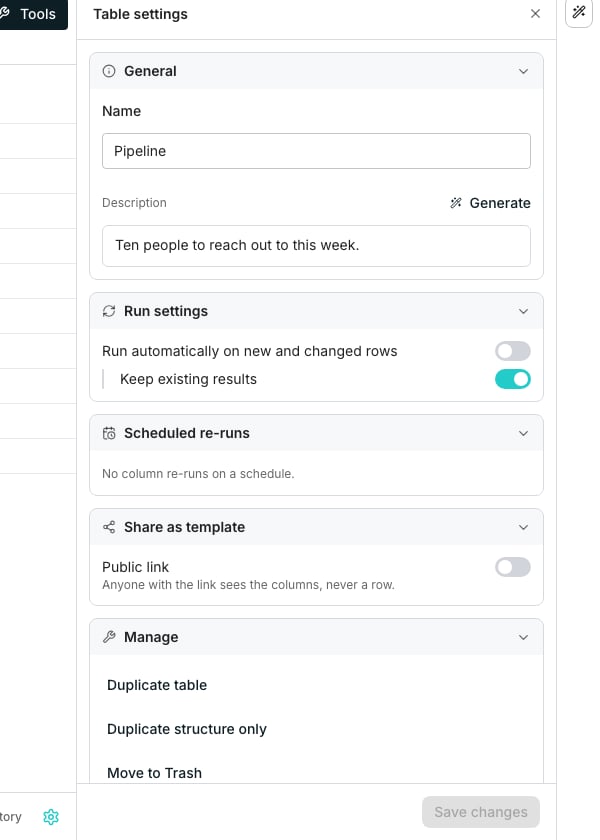
The Table settings panel, open on General.
What’s in the panel
- General, for the table’s name, its owner and its description
- Run settings, for Run automatically on new and changed rows and Keep existing results
- Scheduled re-runs, a read only list of columns refreshing on their own
- Deduplication, to remove duplicate rows by one column’s value
- Share as template, to publish the table’s columns as a public link
- Manage, to duplicate the table or move it to Trash
Change who owns it
Owner, under General, says who to ask about the table, and grants no access. Pick anyone in your workspace, or No owner. It saves as soon as you pick, and the Tables list’s Owner column shows the change.Set how columns run
Turn on Run automatically on new and changed rows so columns fill their cells by themselves when inputs change or rows arrive. Turn on Keep existing results, underneath it, so a run only touches cells that errored, are empty, or are new.Manage the table
Duplicate table copies it with rows, and Duplicate structure only copies just its columns. Move to Trash moves it there in one click, and the toast that follows carries Undo.Good to know
Does Run settings apply to every column?
Does Run settings apply to every column?
It sets the table’s default. A column can turn Run automatically on new and changed rows off for itself under its own Run conditions.
Does a refresh from a connected tool follow Run settings?
Does a refresh from a connected tool follow Run settings?
Yes. With Run automatically on new and changed rows on, columns fill the rows the refresh added or changed, plus any still out of date from before. With it off, the rows a refresh changes stay out of date until you run them. The first import still fills the fields you picked.
Can I set a column's schedule from here?
Can I set a column's schedule from here?
No. Scheduled re-runs only reports what is already set. Open the column’s own Run conditions to change it.
Is Deduplication here a standing rule?
Is Deduplication here a standing rule?
No. It is a one time cleanup you trigger yourself, not a rule that catches every row that arrives afterward.
Does Move to Trash remove it for good?
Does Move to Trash remove it for good?
No. The table stays in Trash for 30 days, where it can still be restored.
Next steps
Schedule a re-run
Set the schedules this panel lists.
Share a table
See what a signed out visitor sees, and how to revoke a link.
Clean up your data
Read the full walkthrough for removing duplicate rows.