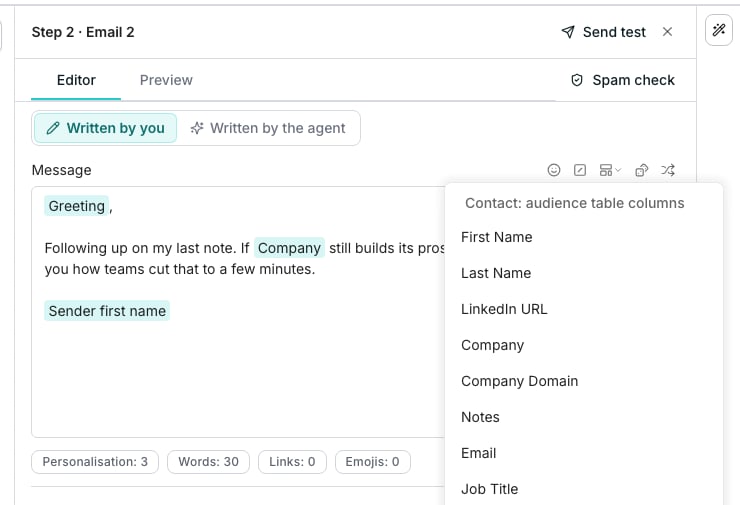
The variables menu, open beside an email's message.
Insert a variable
Type/ in the subject or message, or click the variables icon beside the field. The menu lists every column of the audience table, plus sender fields and context entries like today’s date or a greeting. Picking one inserts a pill that resolves to that contact’s value when the step sends.
If the column behind a pill is later deleted, the pill turns red and names the problem on hover. A required variable left blank for a contact skips that contact rather than sending a gap.
Rotate the wording
Select words and click the Spintax icon beside the field, or type/spintax. Selected words become the first phrasing, and Insert needs at least two. Each contact locks onto one, so a preview and the real send agree.
Autospintax proposes rotations for you: select a sentence first to scope it, or leave the draft as it is to cover the whole message. Review each suggestion and accept only the ones you want.
Good to know
What happens if the column behind a variable gets deleted?
What happens if the column behind a variable gets deleted?
The pill turns red and shows why on hover. Remove the reference or restore the column to fix it.
Why does spintax need at least two options?
Why does spintax need at least two options?
One alternative is just text. Add option stays available until 20 phrasings are added.
How do I rotate a whole subject line?
How do I rotate a whole subject line?
Click the Spintax icon beside Subject with nothing selected. The whole line becomes the first phrasing, ready for you to add the others. A phrasing cannot hold a variable, so a subject with one gets an empty rotation at the caret instead.
Can I edit a spintax rotation after inserting it?
Can I edit a spintax rotation after inserting it?
Yes. In the editor, a rotation reads as its first phrasing with a dotted underline. Click those words to see every phrasing, change them and click Save. Remove spintax keeps the first phrasing as plain words.
Can AI write a line for each contact?
Can AI write a line for each contact?
Not inside words you type. Hand the step to the agent with Written by the agent, and it writes the whole email for each contact from their row.
Next steps
Email steps
Write the subject and message a step sends.
Message templates
Save a message with its variables ready to reuse.