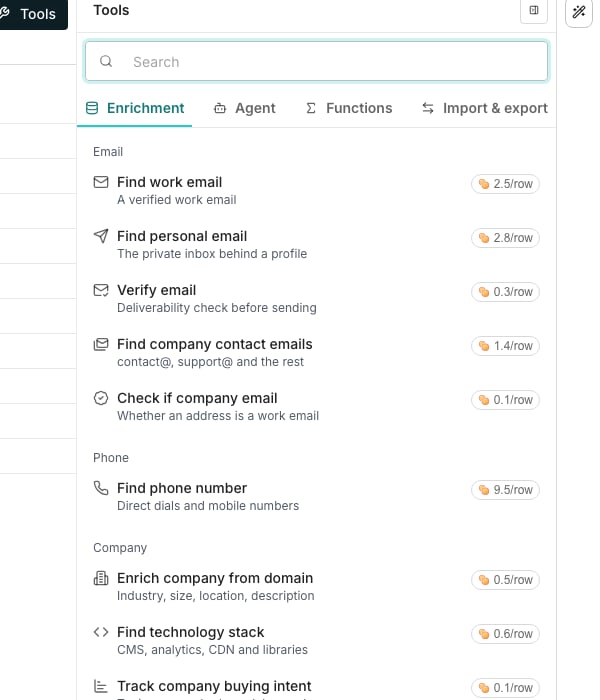
The Enrichment tab, with the cost beside every enrichment.
One enrichment, several sources
When an enrichment runs, it checks each person or company against the sources in order until one answers. The first answer wins. Anyone the first source misses still gets a chance from the rest, which is why results are more complete than from any single source. The order is set by accuracy, not price. For most enrichments, the sources that test most accurate and complete for that detail go first. The ones answering best on recent runs come next, then the rest, cheapest first.What you pay for
Each source has its own price. A row is charged the price of the source that answered it, and nothing when no source can answer. An answer reused from an earlier run is free too. So where the prices differ, the catalog shows the most a row can cost and what a row usually costs. An enrichment whose sources share one price shows that one price. A run holds the most it could cost and releases what it did not use when it finishes.Answers you can act on
Find work email results are checked against multiple sources, and Verify email runs a deliverability check before sending. Verified emails bounce less, which protects your senders. See Email deliverability for the sending side.Good to know
Why is there still no answer after a run?
Why is there still no answer after a run?
No source had an answer, so nothing was charged. Add a stronger identifier, like a LinkedIn URL, and run the enrichment again.
Why was an enrichment skipped instead of run?
Why was an enrichment skipped instead of run?
An input the enrichment requires was empty. Skipped ones are never charged. Fill the input and run the enrichment again.
Can I pick which source answers?
Can I pick which source answers?
No. The order puts accuracy and coverage first, so a row is asked of the most reliable sources first, not the cheapest. Each row still pays only the price of the source that answered it, never more than the most shown.
Do answers go stale?
Do answers go stale?
People change jobs and companies change size, so old answers can drift. The run menu’s option for out-of-date answers refreshes them when you need it.
Next steps
Enrichment columns
Add an enrichment from the catalog and set up its inputs.
Run columns
Control what runs, when, and over how much of your list.
Credits and billing
See where credits go and how to buy more.