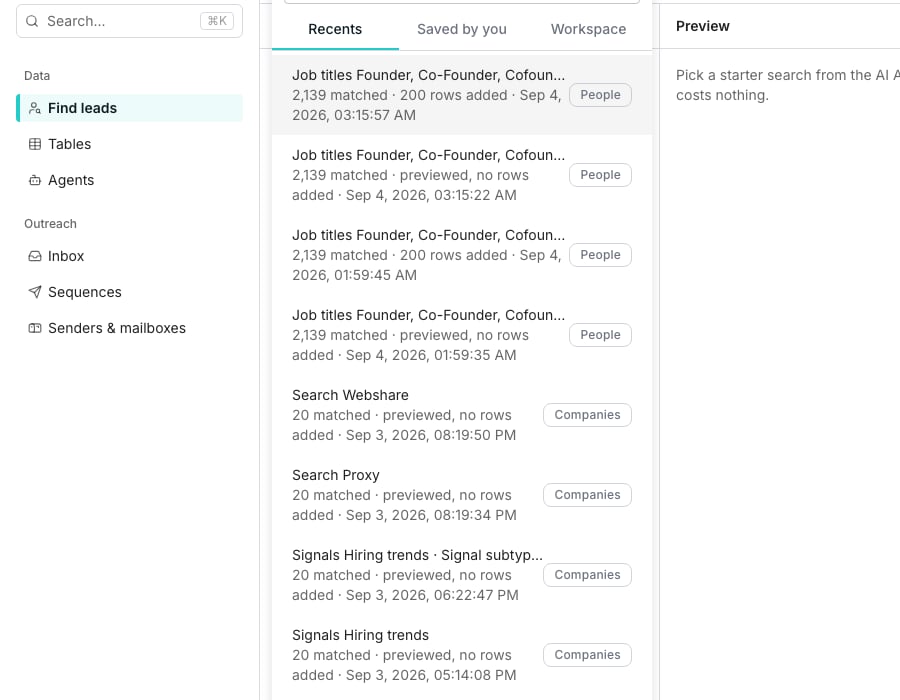
Past searches, open above the filter panel.
Save a search
Set filters on Find people until the count shows what you want. Saving needs a search that is not empty. Click Save search, keep or change the suggested name, add an optional description, then click Save. Nothing runs and nothing is spent by saving. The search is listed under Past searches for the whole workspace.Reopen a past search
Click Past searches to open three tabs:
Clicking a row loads its filters into the builder. Nothing runs again until you do.
Start a search from suggestions or a table
The Find leads page offers a few suggested searches under the search box. They’re drawn from your business context once it’s filled in, and labelled Quick start until then. Click one to load its filters immediately, without typing anything. To search from a table instead, set Start from to A table of companies in the Companies filter group. Then click Choose a company table…, pick a table, and pick the column holding each company’s website or LinkedIn page. The search follows the table. Every count, preview and run reads the column again, so companies you add later are searched too.- Pick a saved view to follow only the rows it shows.
- Exclude from a table… drops a table’s companies out of the results instead of searching for them.
Re-run a search on a schedule
A search attached to a table can run again on a schedule instead of only by hand. Attach one through Save to an existing table, or from a table’s own Lead search panel.1
Open the table's Lead search panel
On a table built from a search, click Lead search in the toolbar, then Edit inputs.
2
Choose On a schedule
Under Run this search, switch from Manually to On a schedule.
3
Set the cadence and save
Pick a Frequency, a time and a start date, then click Save schedule. Each run finds new matches and waits for your approval before adding them.
Good to know
Where do I find a table's search once it's created?
Where do I find a table's search once it's created?
Click Lead search in the table’s toolbar. It only appears on a table built from a search, and shows the filters, the last run, and the schedule.A run still adding rows reads Adding rows, with how many are in so far. Running that search again is refused until it finishes, so the same rows are never added twice.
Does a scheduled run add new matches by itself?
Does a scheduled run add new matches by itself?
No. It counts the matches the table doesn’t hold yet and prices them, but adds nothing and spends nothing on its own.The Lead search panel then shows New matches waiting for your approval, with the price on the Approve button. Click Approve to add them, or Dismiss to leave the table as it is.Turn on New search matches in notifications to hear when one is waiting.
How do I change how many rows the search adds?
How do I change how many rows the search adds?
Open the table’s Lead search panel and click Edit inputs. People to add stands beside Save & run search at the bottom of the search page, filled with the saved number.
What happens if I remove a search from a table?
What happens if I remove a search from a table?
You’re asked whether to keep the rows it already added, or delete them along with the search.
Does saving a search cost anything?
Does saving a search cost anything?
No. Saving only stores the filters. Running or previewing the search is what counts and spends credits.
What happens when the table I follow gains companies?
What happens when the table I follow gains companies?
The people table offers to find the people at the new companies only. Its Lead search panel shows New matches waiting for your approval, priced, and nothing is added until you click Approve.People already found at a company you later remove stay in the table.
How many companies can a search follow?
How many companies can a search follow?
Up to 5,000. A table with more is refused rather than cut off, so follow a saved view that narrows it.
Why was the column I picked refused?
Why was the column I picked refused?
A search matches a company by its website or LinkedIn page, never by its name. A column of names, an empty column, or a deleted table or view refuses the search, so it never runs wider than you asked.
What if a company in my table matches no one?
What if a company in my table matches no one?
A website also matches its main domain, the site it redirects to, and how the people search lists that company. A warning under the followed table counts the companies that still match no one, and Companies that match no one lists them. Where a company of the same name has people, the list says how many, so you can fix that website in your table.
Next steps
People and companies
Build the search you’ll save or reuse.
AI Assistant
Describe a search instead of building one by hand.