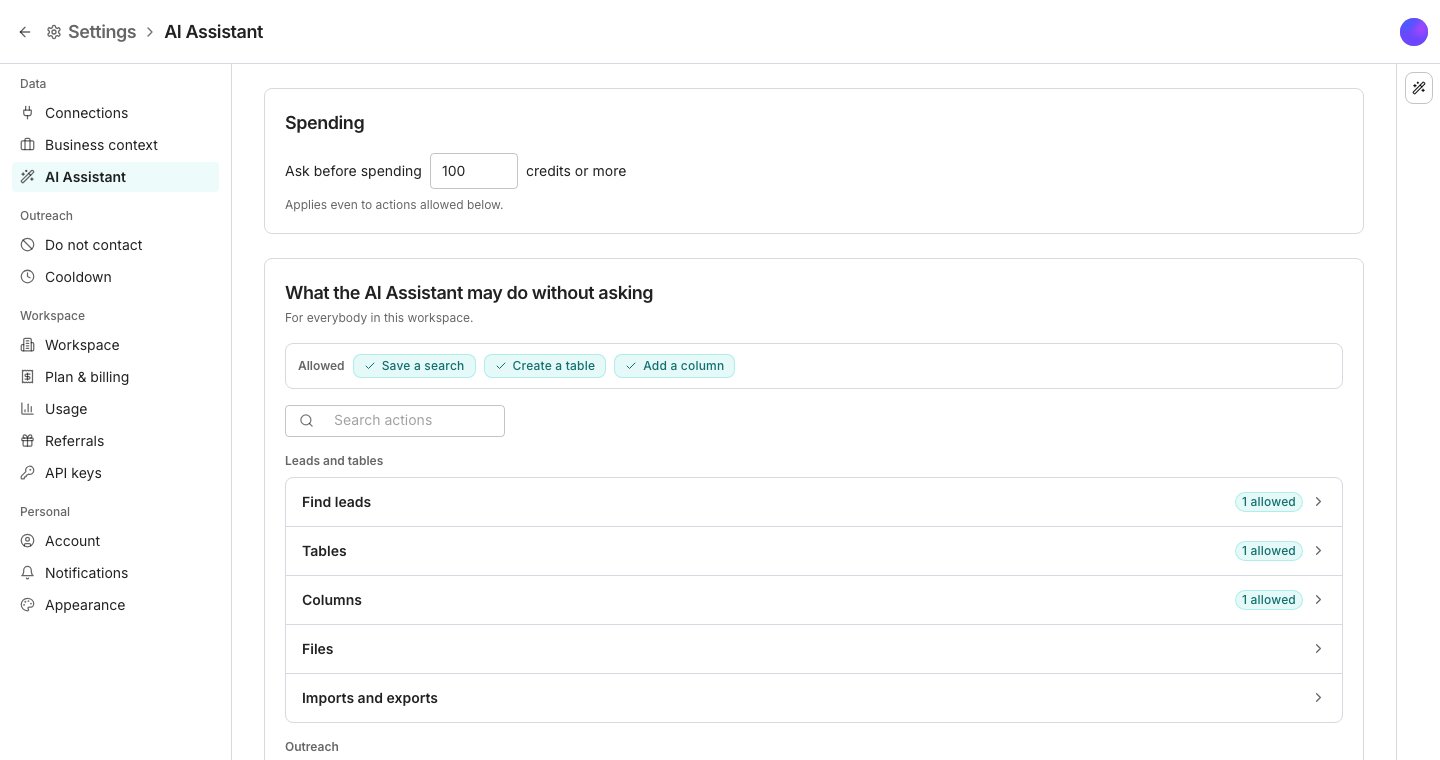
The AI Assistant pane, in Settings.
Set the spend threshold
On AI Assistant, under Spending, the line Ask before spending holds a number in whole credits, followed by credits or more. Type a number and press Enter, or click away, to save it. Any change that could cost that number or more waits for Approve, even one allowed below, and agents follow it too. Free work never counts as a spend. A table’s column run asks you to confirm at the same number.Allow changes without asking
Under What the AI Assistant may do without asking, the Allowed line lists what is allowed now. Click one to jump to its switch, or to Take back for an action allowed on its own. Groups are listed under Leads and tables, Outreach, Agents, and Workspace. Each starts shut and shows how many of its actions are allowed, if any. Click one to open it. Each switch is one kind of change, worded as its card, such as Add a column. On, it applies as soon as proposed. Everything else waits on a card for Approve or Dismiss. New conversations start with this list. On a card, the arrow beside Approve allows that kind of change for this conversation, for you in this workspace, or for everybody in it. Take one back from Allowed in the conversation’s header. Some changes always ask, whatever the switches say.Good to know
What does a group's last switch cover?
What does a group's last switch cover?
The rest of the group’s actions. It is named for the group, such as Everything else in Columns, and lists those actions right under it, each ticked when it is allowed. In Integrations, Sequence messages, and Notifications it covers one action, so it is named after that action and lists nothing. Account and Senders have only this switch, such as Everything in Account, and Files has none. Reading is not on the list, because reading is always allowed and never spends.
How do I find one action without opening every group?
How do I find one action without opening every group?
Type its name in the search box above the groups. The groups holding a match open, showing only what matches.
Which changes can never be allowed without asking?
Which changes can never be allowed without asking?
A change that can never be allowed has no switch in the AI Assistant’s list. Under What agents in tables may do without asking it reads Always asks where its switch would be, like pushing rows to a connected tool. Adding contacts to a sequence reads Asks when the sequence is running: allowed, it still asks whenever the sequence is live.These changes wait for Approve every time, even when the switch that covers them is on:
- Sending anything.
- Removing anything, including an AI column’s outputs or an entry on the do-not-contact list.
- Stopping contacts in a sequence, or adding contacts to one that is running.
- Loosening what waits for a person: a sender’s send mode, resuming a paused sender, LinkedIn steps set to run automatically, or a sequence’s approval set to follow the sender.
- Letting an agent act without asking.
- Rewriting your business context from your website, or rewriting a reference document’s summary.
- Disconnecting a connected tool.
Where is the switch for a search that adds a table?
Where is the switch for a search that adds a table?
Under Find leads, each search is named for the new table it adds, such as New table of people. People and companies have a switch each, and the group’s last switch covers the searches listed under it. A search on a buying signal is never covered by that switch: each has a switch of its own, on only once you allow it, here or from a card.A few actions in other groups work the same way, each with a switch of its own beside the group’s last switch.
Why does an action say Allowed on its own?
Why does an action say Allowed on its own?
You allowed it for everybody from the arrow beside a card’s Approve, while the switch that covers its group is off. It runs without asking until you click Take back under it.
What does a card show before I approve an edit?
What does a card show before I approve an edit?
Each change, as it is now and as it will be. Open What changes on the card to read them under Now and Proposed.An edit changes only what you asked for, and everything you did not mention stays as it is. Before this, an edit could switch off or reset a setting nobody had named.
Why was a card I had not decided closed with a note?
Why was a card I had not decided closed with a note?
It was raised before the AI Assistant changed how it carries out that kind of change, so approving it now would do something the card never showed. It was closed with a note asking you to ask again, and the new card says exactly what changes.
Can the AI Assistant change these settings for me?
Can the AI Assistant change these settings for me?
No. It cannot change the threshold or these lists. Change them on this page, or allow one kind of change for longer from the arrow beside a card’s Approve.
Can I take back a change the assistant made?
Can I take back a change the assistant made?
Not from the card. A change it made is an ordinary change afterwards, so you undo it where you would undo your own: delete the column from its header menu, remove the contacts from the sequence, move the table to Trash. Credits already spent stay on your usage either way, so approve a priced card only when you want the work.
Why does the table ask me to confirm a run at this number?
Why does the table ask me to confirm a run at this number?
The confirmation before an expensive column run uses the same threshold, so one number decides when a person is asked, whether the assistant or you started the work.
Can an agent get its own list?
Can an agent get its own list?
Yes. What agents in tables may do without asking, at the bottom of this page, sets the defaults for agents running in a table. An agent’s editor has a Workspace actions section with the same switches, starting from those defaults. Use workspace defaults hands the list back, so a change here reaches every agent that never set its own.The AI Assistant can change an agent’s list when you ask, and that change always waits for your Approve.
Who can change these settings?
Who can change these settings?
Anyone in the workspace. A change reaches every conversation and agent that follows the defaults straight away.
Next steps
Chat
Ask for a change and watch it arrive as a card.
Run columns
How a run is priced, held, and confirmed before it starts.