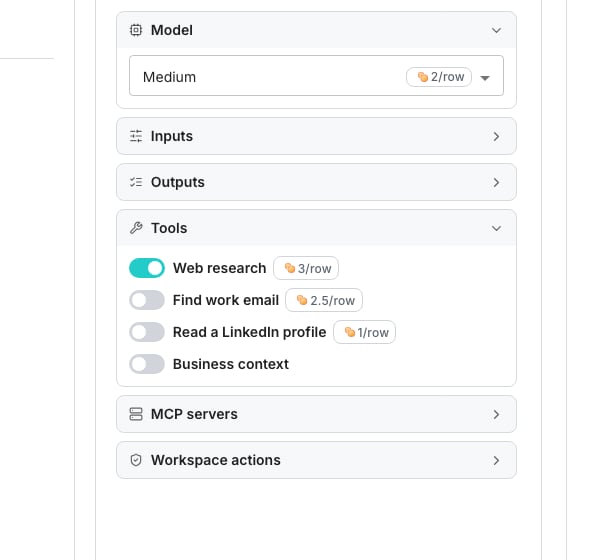
An agent's configuration, before anything runs.
What sets the maximum
The most one row can cost is the sum of what you switch on:- Effort, the level you pick or leave on Auto, sets the base
- Web research adds its own amount on top when it is on
- Each lookup under Tools, such as Find work email, adds its own price
- An added server under MCP servers adds nothing, because the agent works with it inside the base
What a row is charged
A row pays for the share of its research budget it used. An agent that answers early pays a fraction of its maximum. A row that ends with no answer pays the same way, because the research was done either way. A lookup is charged only when it finds something, and at most once per row.See the maximum before you run
The maximum shows wherever you are about to spend it. That means beside each effort level, on the Web research switch, beside each lookup, and on the button that commits a deploy. Open Effort to see every level’s base, or click Compare effort levels to read them side by side.See what a column spent
A column shows what it has spent beside its name in the header. Hover it for the rows it charged and the average per row. Open a cell to see its charge against its maximum, and hover the charge for what it was made of. In the column menu, open More and choose View activity… to list each run’s charge beside its estimate.Good to know
Why did a run cost less than its estimate?
Why did a run cost less than its estimate?
The estimate holds the most every row could cost, and each row is charged what it used. The part a run did not use never leaves your balance. It is released when the run finishes.
Does an added MCP server change the price?
Does an added MCP server change the price?
No. With web research off, an agent that calls your MCP servers works inside the base and is charged what it used.
Do the lookups add to the price per row?
Do the lookups add to the price per row?
Only when they find something. Each lookup you switch on raises the maximum by its price, and a row is charged that price once when the lookup returns a result.Every effort level can use every lookup.
Is a column without research charged the same way?
Is a column without research charged the same way?
Yes. It makes one AI call per row and is charged what that call used, up to the level’s base.
Are built-in agents charged the same way?
Are built-in agents charged the same way?
No. A column deployed straight from Built-in agents has one flat price per row, shown before it runs. A row that gets an answer is charged that price, and a row with no answer or an error is not charged.
Does training cost credits too?
Does training cost credits too?
Yes. Training charges each sample row what it used, up to the same maximum a deployed column has. Training never buys lookups, and the estimate shows before you start.
Where do I see what an agent has actually spent?
Where do I see what an agent has actually spent?
On the column itself, in its header and in each cell, and in the table’s Credit usage report. Your overall spend, including agent runs, is on the Credits and billing page.
Next steps
Choose an effort level
Weigh cost against depth before you pick one.
Credits and billing
See your credit balance and the two ways to buy more.