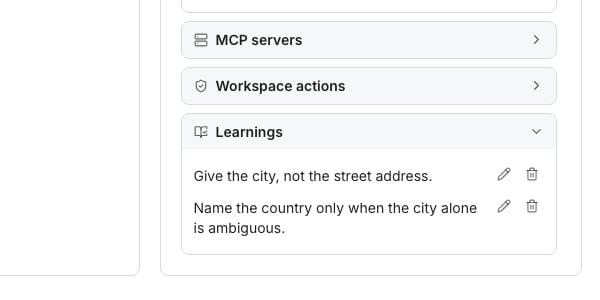
An agent's Learnings, at the foot of its Configuration panel.
Mark an output Needs work
Needs work sits on everything an agent writes:- A cell an agent filled in a table. Right-click it, or a selection of cells, or open the cell.
- An example on an agent’s Preview tab.
- A message the agent wrote that waits in Tasks.
- A contact’s thread on a sequence’s AI writing tab.
- A reply the agent drafted in the Inbox.
1
Click Needs work
Click Needs work on the output you disagree with.
2
Say what's wrong
Answer What’s wrong? in a sentence or two. The reason is required, because it is what the agent learns from.
3
Send it
Send it with the button under your reason. The agent saves a learning and does that output again, in the same place.
Undo a learning
Click Undo on the note. The learning is removed, and the output goes back to what it was before.- On Preview, the original comes back at once, even mid-run. On a table, the run stops first. On Tasks and in the Inbox, the new message finishes first.
- An output edited, decided or sent since keeps its new words, and the note says why.
- When your reason changed a learning the agent already had, Undo puts back its earlier words.
Edit or delete a learning
Every agent lists what it learned under Learnings. It is in the agent’s editor, in an AI column’s editor, and under How it writes on a sequence’s AI writing tab. Click Edit to reword a learning, or Delete to remove it, with Undo in the message that follows. A column that runs a saved agent shows that agent’s learnings read only, with Open agent to change them.Keep the prompt short
An agent’s prompt is its goal, in one to three lines. Leave the rules to its learnings: each Needs work adds the rule your reason gives.Good to know
Can I add a learning by hand?
Can I add a learning by hand?
No. Learnings come from Needs work on a real output, so each one answers something the agent got wrong. You can reword any of them under Learnings.An agent copied from a built-in template starts with that template’s rules as its learnings, whether you apply the template on Agents or ask the AI Assistant for a copy.
How many learnings can an agent keep?
How many learnings can an agent keep?
- Once it has 30, Needs work asks you to delete one under Learnings before it adds another. A reason that refines a learning the agent already has updates it instead of adding one.
What does Needs work cost?
What does Needs work cost?
Saving a learning is free. Doing the output again costs what running it again costs. On a table that is the price of Run cells on those cells, and on Preview it is the price of that example.On a table and on Preview, the price shows beside the button before you send. On Tasks and in the Inbox, the message is charged as any message written again. A sequence’s AI writing tab writes the contact again from the day’s free previews.On a table, Undo stops a run still going, and cells it already ran are not refunded. On Preview, Undo drops the example’s new answer and refunds it.
What if I am out of credits?
What if I am out of credits?
The learning is still saved. On a table and on Preview, the button reads Save learning. The output stays as it is until you run it again, and the note says it couldn’t run again.
Does a learning change what the agent already wrote?
Does a learning change what the agent already wrote?
No. Only the output you marked is done again. Other cells, messages waiting in Tasks and threads marked Looks good keep their words.The learning applies to what the agent writes next. A follow-up written ahead that nobody has seen is written again with it when its contact reaches that step.
Which cells can I mark Needs work?
Which cells can I mark Needs work?
Cells an agent filled, in an AI column or a built-in agent’s column, up to 50 at a time. A cell a person wrote, one that failed or was skipped, and one still running have nothing to learn from. Run a failed cell again instead.
Does a learning make a new version of the agent?
Does a learning make a new version of the agent?
No. Learnings sit beside the prompt, outside its versions, so putting an earlier version back keeps them. The exception is a version from before a long prompt was shortened: putting it back removes the learnings taken from that prompt. See Agent versions.
Why is my long prompt shorter now?
Why is my long prompt shorter now?
An agent made before learnings had its long prompt split into its goal and learnings, so it follows the same rules from a short prompt. Feedback you gave it before then may have become learnings too.The agent’s version history lists the split as Shortened into learnings. To go back, click Put back the original prompt under Learnings, then Put back. The learnings taken from that prompt go with it.
How do I try an agent before using it on a table?
How do I try an agent before using it on a table?
Open the agent’s Preview tab, choose a few example rows and run them. Read one example at a time, then click Looks good or Needs work and Next example.Needs work there saves a learning and runs that example again in place. After the last example, click Done, or Choose other examples to try more.
Can the AI Assistant mark something Needs work?
Can the AI Assistant mark something Needs work?
Yes, when you ask and say what’s wrong. It never makes up a reason, and it asks you first every time. It can also list what an agent learned, reword or delete a learning, and undo one.Needs work on a message that already went out is given through the AI Assistant. The message is not sent again, and the agent follows the learning on the messages after it.
Next steps
Read an agent run
Look at the trail behind an answer before you mark it Needs work.
Agent versions
See what each saved prompt was, and put an earlier one back.