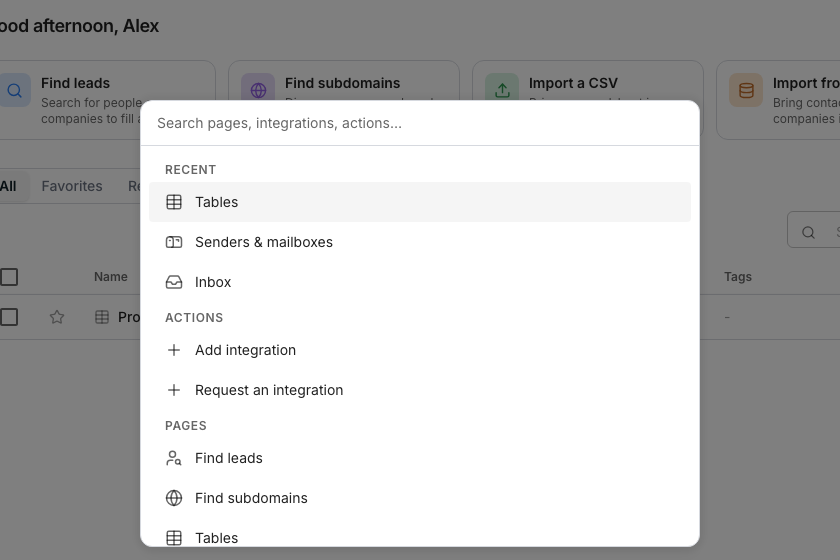
The command palette, open over a table.
Open the command palette
1
Press Cmd+K
Opens the palette from any page. Search pages, integrations and account actions, or jump to a page you visited recently. Use Ctrl+K on Windows and Linux.
2
Press it again
Closes the palette.
Work a table’s grid
Every shortcut below also shows next to its control in the grid’s toolbar.Move around the grid without a mouse
Collapse the sidebar
Press Cmd and the backslash key to collapse or expand the sidebar to icons only. The same combination switches it back.Good to know
What if I use Windows or Linux?
What if I use Windows or Linux?
Use Ctrl instead of Cmd throughout. Every shortcut on this page works the same way on both.
What does Escape do in the grid?
What does Escape do in the grid?
It closes whatever is open, in order: a fill in progress, then a header menu, then an open panel such as Tools. With nothing open, it collapses a multi-cell selection back to one cell.
Are there other shortcuts around the product?
Are there other shortcuts around the product?
Some buttons carry their own single-key shortcut, shown as a small key next to their label. They only fire while you are not typing in a field.
Next steps
Run columns
See what a column’s own run menu can do.
Rows and cells
Learn the rest of the grid.