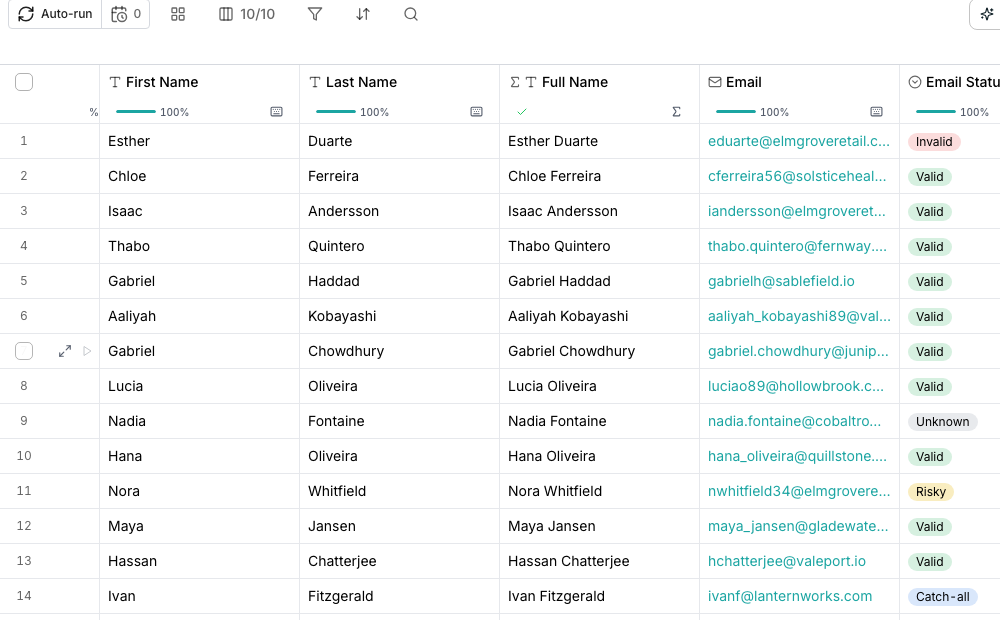
A Verify email column's results in the grid.
Find an address
Find work email checks a person’s name and company against multiple sources until one confirms an address. It returns the address alone; it never claims the mailbox will accept mail.Check whether it is deliverable
Verify email looks up one address and returns a Deliverability verdict: valid, risky, catch-all, invalid, disposable or unknown.Good to know
What does a catch-all verdict mean?
What does a catch-all verdict mean?
The domain accepts mail sent to almost any address at it, so it cannot confirm this particular one is real. Treat it as a soft yes rather than a confirmed address.
What does unknown mean?
What does unknown mean?
None of the sources checked could reach a verdict, often because a mail server temporarily refused the check. Verify it again later rather than treating it as invalid.
Does finding an address also verify it?
Does finding an address also verify it?
No. Finding an address checks multiple sources for a match. Verifying deliverability is a separate action, with its own column and its own cost.
Can I chain the two together?
Can I chain the two together?
Yes. Bind Verify email’s input to the column Find work email fills, so a new row runs both, one after the other.
Next steps
What you can enrich
See every shelf in the enrichment catalog.
What enrichments cost
Read the cost before you run, and know what you’re charged for.