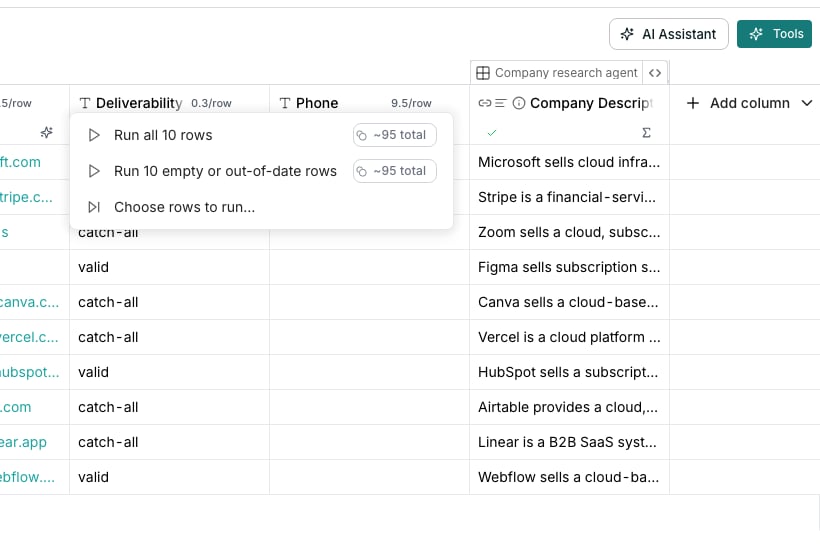
A column's run menu.
Run a column yourself
Click the play button on a column header, or open the header menu and choose Run. The play button is visible on every column that runs (enrichment, function and export), except columns that only extract a field from another column. A function or enrichment column offers:- Run all rows, which recomputes answers you already have
- Run empty or out-of-date rows, to fill the gaps
- Run failed rows, to try again where cells errored
- Run first 10, a quick check before the whole table
- Choose rows to run…, to pick rows yourself
Let runs start automatically
Run automatically on new and changed rows sits in Table settings, under Run settings. Turn it on and columns fill in by themselves when their inputs change or rows arrive. Keep existing results sits under it. With it on, only errored, empty or new cells run again.Watch and stop runs
Answers fill in row by row, each one as soon as it finishes. The status bar under the grid reports how far the current run has got. With nothing running, it reports how much of the table is filled in. Stop beside it halts every run on the table. Answers already in the table stay, and nothing new starts.Run only some rows
A column can carry a condition so it only runs on rows that qualify, and skips the rest at no cost. See Set a run condition.Good to know
What does the percentage at the bottom of the table mean?
What does the percentage at the bottom of the table mean?
It is how much of the table’s runnable work is done. Cells that failed or found nothing count as done, and the failed rows link beside it filters the grid to the rows worth trying again. While nothing runs, it also says how many cells no run has reached yet.
How does running automatically work with Keep existing results?
How does running automatically work with Keep existing results?
Run automatically on new and changed rows decides whether a run starts by itself. Keep existing results decides whether that run overwrites answers you have already paid for. A run then never re-spends credits on a cell that already succeeded.With the first switch off, a column fills in only when you run it.
Can one column auto-run while the rest do not?
Can one column auto-run while the rest do not?
An enrichment column’s Run conditions section carries its own Run automatically on new and changed rows switch.
What happens to rows a run condition rules out?
What happens to rows a run condition rules out?
Rows that do not match are cleared and marked Skipped, rather than left holding a stale answer from an earlier run.
What does stopping a run leave behind?
What does stopping a run leave behind?
Every answer already in the table stays, and you pay for those. A cell still working when you stop is dropped and costs nothing. Everything the run had not started is skipped, and you can run the column again to pick them up.Stop in the status bar is greyed out until there is something to stop.
What happens when the AI model or a data source is busy?
What happens when the AI model or a data source is busy?
The run waits and asks again for each cell that was turned away. It tries up to three more times over a few minutes. Columns that read those cells run after that, in the same run.A cell still turned away after the last try fails. Run failed rows picks it up.
What does the run panel count?
What does the run panel count?
Each scheduled run shows how many of its cells are done. Under that it names failures, cells where nothing was found, and cells that were skipped, counted apart from one another.
How do I set a recurring refresh?
How do I set a recurring refresh?
A column can refresh on a schedule. See Schedule a re-run.
Does a function column run differently?
Does a function column run differently?
No. Function and enrichment columns share one run menu, with the same options. An export column has its own two, covered on Export to a tool.
Why do some run options name a row count?
Why do some run options name a row count?
Run all rows, Run empty or out-of-date rows and Run failed rows name how many rows they cover once Oneprofile has counted them. On a 50 row table the first two read Run all 50 rows and Run 50 empty or out-of-date rows.
Next steps
Views
Change what you are looking at without touching the data.
Set a run condition
Run a column only on the rows that qualify.
Schedule a re-run
Keep a column fresh on a schedule.
Enrichment columns
Add work emails, phone numbers and company facts from outside sources.