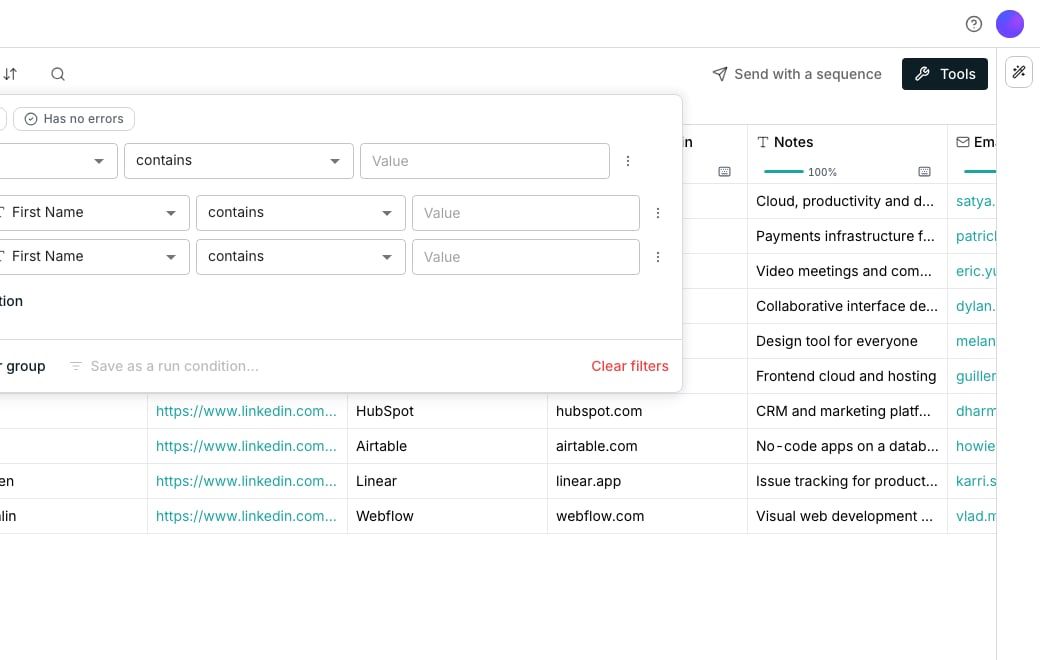
The filter panel, open on a nested group.
Filter to the rows you want
Click Filter in the toolbar, or choose Filter on this column from a column’s header menu to start already on that column. Then click Add filter for a row, or Add filter group to nest one and/or block one level deep. Operators follow the column’s type. Text offers contains, starts with and is empty. Numbers, dates and computed columns add their own, like > and has an error.See what is filtered
Every filter shows as a chip under the toolbar, beside a count of the rows that match. The sort leads them, as one chip. Click a chip to edit it, or Clear all to show every row in the table’s own order.Sort by more than one column
Click Sort in the toolbar. The first row reads Sort by, and every row after it reads then by. Click Add sort to stack another column, and drag a row to change which one wins first. Direction reads in the column’s own words: text sorts A → Z, numbers sort smallest first, dates sort oldest first.Search inside the table
Click Search in the toolbar, or press Cmd+F, to open a search box in the toolbar. Type to see how many matches it finds, and press Enter or Shift+Enter to step through them.Good to know
How do I see only rows with an error, or only rows without one?
How do I see only rows with an error, or only rows without one?
Click Has an error or Has no errors at the top of the Filter panel. Both check every column at once. In a filter row, the same questions sit under Any column, first in the column list.
Does a filter change what a run covers?
Does a filter change what a run covers?
A filter changes only what is on screen. A column’s run menu still processes the rows it is set to cover, whether that is every row or a chosen few, filtered or not.To run just what you are looking at, tick the filtered rows yourself and click Run in the bar that appears. See Run columns for the full run menu.
Why did Add filter grey out?
Why did Add filter grey out?
A table allows eight conditions in total, however they are grouped. At the limit the button reads At the 8-filter limit. Remove one before adding another.
Can I nest a group inside a group?
Can I nest a group inside a group?
No. Groups go exactly one level deep, so a top-level and/or can hold groups, each with its own and/or, never a group inside a group.
What happens to a filter on a column I delete or retype?
What happens to a filter on a column I delete or retype?
It is dropped automatically, along with any group it would leave empty. A table never goes blank from a filter pointing at something that no longer exists.
Can I match more than one value in one condition?
Can I match more than one value in one condition?
Yes. Choose contains any of or does not contain any of and separate the values with commas.
Can I sort from a column's header?
Can I sort from a column's header?
Yes. Its menu builds the same stack. With another column already sorted, it offers Then sort A → Z and Then sort Z → A, which add the column as the next level. A date or number column names its own order instead, like newest first. A sorted column’s menu ticks its direction and offers Remove from sort.Each sorted header shows an arrow, numbered once more than one column is sorted.
What happens to a row I add while a filter is on?
What happens to a row I add while a filter is on?
It stays on screen, tagged Outside the filter, until you change the filter or leave the table. The row count under the toolbar still counts only the rows the filter matches.
Does a saved view keep my filter and sort?
Does a saved view keep my filter and sort?
Yes. Saving a view captures your filters, the sort and the visible columns together, including Has an error and Has no errors. Switching views swaps them all at once.
What do the numbers on a column's header mean?
What do the numbers on a column's header mean?
The number beside a warning triangle counts the rows where that column failed. Click it to show only those rows, on top of any filters already on. Click it again to show every row.The number beside a coin is the credits the column has spent so far. It is not a filter.
Does a cell that found nothing count as an error?
Does a cell that found nothing count as an error?
No. A run that searched and came back empty shows Nothing found, and has an error leaves it out. Only a run that failed counts.
Next steps
Views
Save a filter and sort together as a view you can switch back to.
Run columns
Choose which rows a column actually runs over.