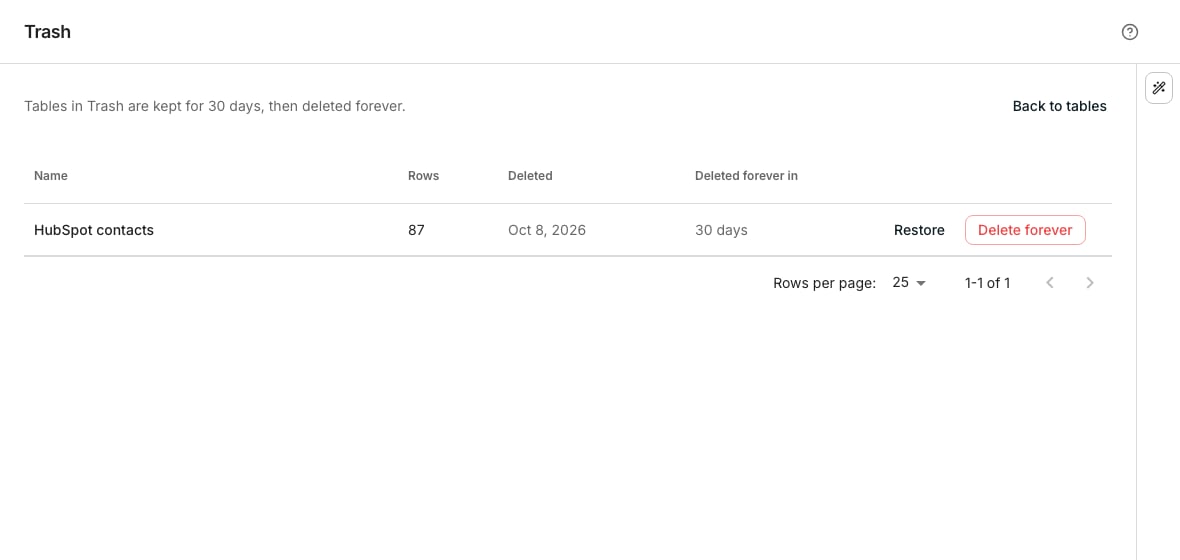
The Trash list, with a table close to its purge date.
Find a deleted table
Click Trash in the sidebar. Each row names the table, its row count, when it was deleted, and how many days remain before it is gone for good.Restore or remove it
On Trash, Restore on the table’s row returns it to your table list, with every column, row and cell it had. Delete forever removes it permanently. A confirmation names the table and warns that this cannot be undone.Restore a deleted folder
A folder moved to Trash takes every folder and table in it along, and Trash lists it with how many tables went too. Restore brings the folder back where it was, with all of them. Delete forever removes the folder and its tables for good.Good to know
How long does a deleted table stay in Trash?
How long does a deleted table stay in Trash?
Tables in Trash are kept for 30 days, with every column, row and cell they held. After that they are deleted forever. A folder is kept just as long, with its tables.
Why did one table stay in Trash when I restored its folder?
Why did one table stay in Trash when I restored its folder?
Another table took its name while it was in Trash, and two tables cannot share a name. Rename the other table, then restore this one from Trash on its own. It comes back into its folder.
Where does a restored table or folder go?
Where does a restored table or folder go?
Back into the folder it was in. If that folder is in Trash too, or gone for good, it comes back at the top of your table list.
Can I sort or search the Trash list?
Can I sort or search the Trash list?
You can sort it by name. There is no search box, so scan the list for the table you want.
Can I restore or delete more than one table at a time?
Can I restore or delete more than one table at a time?
No. Restore and Delete forever each act on one row at a time.
Is there another way to undo a delete?
Is there another way to undo a delete?
Yes. Moving a table to Trash takes one click, and the toast that says so carries Undo for a few seconds. Past that, Trash is where you find it.
Next steps
Create a table
Start a new one while an old one sits in Trash.
Table settings
Move a table to Trash from its own settings panel.