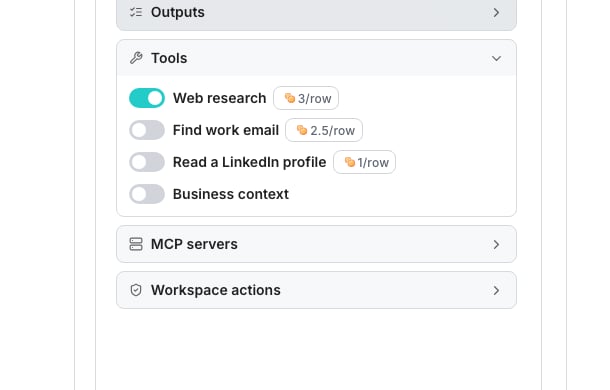
The Tools section, with Web research, the two lookups and Business context.
Turn on web research
In Tools, turn on Web research. The credit chip beside it shows what it adds to the most a row can cost. A run with web research on can search and read pages before it answers. That takes longer, and can cost more per row than reasoning over what you gave it.Let it look people up
Tools holds two lookup switches under Web research: Find work email and Read a LinkedIn profile. Turn one on and the agent may take that lookup while it researches, when it decides the answer needs it. Each lookup wears a chip with its price, which raises the most a row can cost. A row is charged it only when the lookup finds something, and each lookup it takes shows as a step on the cell’s trail.Give it your business context
Business context is one AI profile for the workspace: your company, your customers, your buyers, your timing, your proof, and the documents you added. An agent can lean on all of it, or point at just one part. In Tools, turn on Business context to fold your AI business context into every run. To reference just one part instead, type an @ in the prompt and choose a section, such as Ideal customer profile.Good to know
Why is the Business context switch greyed out?
Why is the Business context switch greyed out?
Your prompt already references your business context, so the switch is held on. Take the mention out of the prompt to release it.
What sections can a prompt point at with @?
What sections can a prompt point at with @?
Business context for the whole profile, or Company description, Ideal customer profile, Ideal buyer personas, Interest signals and Social proof for one part of it.
Does an added MCP server turn on research even with web research off?
Does an added MCP server turn on research even with web research off?
Yes. An added server does the same research at its own rate. That sits between having no research at all and having web research on.
What happens when a page refuses to be read?
What happens when a page refuses to be read?
The agent tries the page again by another route, and then with a rendered browser. The step on the trail says which one answered.A site fronted by a bot challenge is left alone for a short while, so the next row does not pay to be turned away again.
Can the agent read a PDF?
Can the agent read a PDF?
No. The agent reads web pages only, so a link to a PDF, a Word document, a spreadsheet or any other file is refused. The step on the trail says so.The agent then uses what the search result says about the file, or finds the same facts on a web page.
How long can a cell spend on research?
How long can a cell spend on research?
A cell that researches the web has its own time limit, and it stops reading in time to write its answer.A cell that runs out of time keeps every step it recorded and says the research ran out of time. See Read an agent run.
What does each lookup find?
What does each lookup find?
Find work email finds a work address for the person on the row. Read a LinkedIn profile reads the headline, role, company, location, about text and work history behind a profile link the agent has found.
How does an agent find who holds a role at a company?
How does an agent find who holds a role at a company?
Turn on Web research and name the role in your prompt. The agent searches the web for that person.
Why is a lookup switch greyed out or missing?
Why is a lookup switch greyed out or missing?
Its supplier is not available to your workspace right now. A lookup that is off is hidden until it returns. One that is already on stays on, greyed out, and says Not available right now. Every effort level can use every lookup.
Does a lookup change the price per row?
Does a lookup change the price per row?
Only when it finds something. A lookup you switch on raises the row’s maximum by its price, and a row is charged that price once when the lookup returns a result. See What agents cost.
Can the agent take the same lookup twice on one row?
Can the agent take the same lookup twice on one row?
It takes one work email a row, and reads a profile once per link. A repeat of the same link is refused, and the refusal shows on the trail. A row pays for each lookup once however many links it reads.
Does training take lookups?
Does training take lookups?
No. A training round runs without lookups, so nothing is spent on a row you may not keep. A column’s run takes them, including a run on its first 10 rows.
Where do I edit the actual context text?
Where do I edit the actual context text?
On the Business context page, where each section has its own field and helper text.
Next steps
Business context
Write the company facts an agent can fold into its answers.
What agents cost
See how research and effort together move the price.
Build an agent
Write the prompt this research feeds.