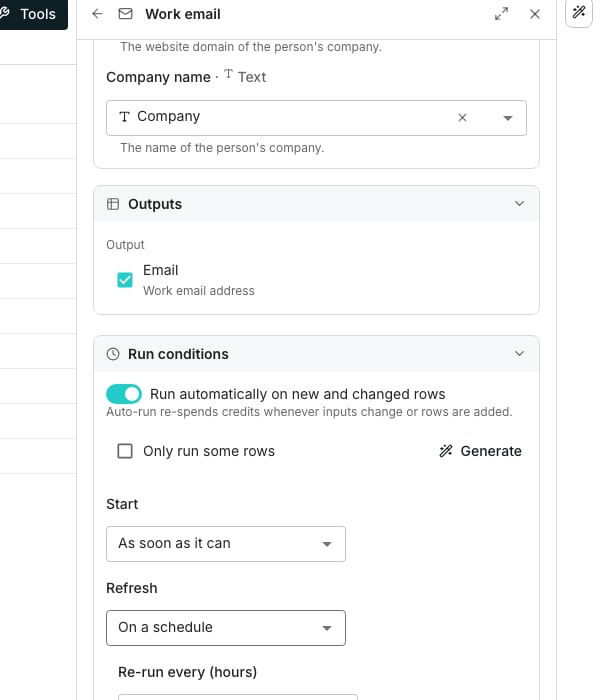
A column's recurring refresh, set from Run conditions.
Keep a column fresh
Open the column’s editor and expand Run conditions. Set Refresh to On a schedule instead of Only when triggered, then set Re-run every (hours). It runs until you turn it off, and the editor projects the monthly credit cost before you save.Refresh a table from its source
A table built from a connected tool carries a Source button at the bottom of the grid. Turn on Schedule refreshes, choose a Frequency of Hourly, Daily, Weekly, Monthly, Quarterly or Custom, and set a time under At. A manual Refresh now sits above the schedule, offering Re-fetch everything or Re-fetch and delete rows removed from the tool. Either way, a refresh updates rows already in the table rather than duplicating them.Re-run a saved search
Open the table’s Lead search panel and click Edit inputs. Under Run this search, choose On a schedule instead of Manually, and set a Frequency, a time under At and a Starting from date. Then click Save schedule. A scheduled search never adds rows or spends credits on its own. Each run counts the new matches and prices them, then waits in the table’s Lead search panel for someone to click Approve. Approved matches are added as new rows, and rows already in the table are never changed.Good to know
What's the difference between refreshing a source and re-running a search?
What's the difference between refreshing a source and re-running a search?
Refreshing a connected tool updates rows already in the table. A scheduled search only proposes new matches, and they’re added once someone approves them. Existing rows are left alone.
Do my columns update after a refresh from a tool?
Do my columns update after a refresh from a tool?
Only while Run automatically on new and changed rows is on in Table settings. Then they fill the rows the refresh added or changed, and no others.With it off, those cells stay out of date until you run them. The first import always fills the fields you picked.
Can removed upstream records be cleared out automatically?
Can removed upstream records be cleared out automatically?
Yes. Turn on Delete rows removed from the tool so a row that disappeared upstream is removed here too.
Can I pause a schedule without turning it off?
Can I pause a schedule without turning it off?
Yes. Paused stops a source’s refreshes from firing while keeping its frequency and time in place.
Where do I see every column on a schedule at once?
Where do I see every column on a schedule at once?
Table settings lists them under Scheduled re-runs, though you can only change one from the column’s own Run conditions.
Next steps
Set a run condition
Limit a schedule to the rows that actually qualify.
Table settings
See every schedule on a table in one place.
Run columns
Every other way a column fills its cells.