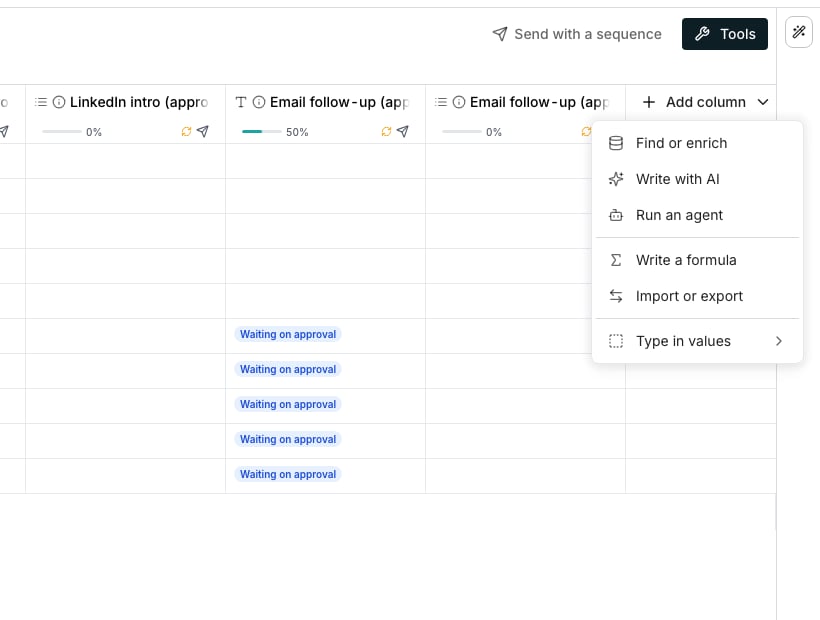
The Add column menu at the end of the table's header row.
Open the menu
Open a table from Tables. Add column sits at the end of the header row, and the menu it opens splits in two.- For a detail that fills in automatically: Find or enrich, Write with AI, Run an agent, Write a formula or Import or export. Each opens its own editor, or the full catalog.
- For a value you type, Type in values opens the plain types: Text, Paragraph, Number, Currency, Date, URL, Email or Image from URL. For a choice: Checkbox, Select, Multi-select or Assigned to.
Browse the full catalog
Tools in the toolbar opens the same catalog, on four tabs:- Enrichment, filled in for you
- Agent, written by your own agents
- Functions, free formulas
- Import & export, for contacts in and out
Search, or ask for one
Type into Search to match what a row does, not just its name: “combine two columns” finds Merge columns. Keep typing and a Create a column with AI for row appears.See the cost first
Every row shows its cost in credits before you click it. An enrichment whose sources are priced differently shows the most a row can cost and what one usually costs. A row still settling on a rate shows Varies instead.Compare the six kinds
Six kinds get their answers six different ways.Good to know
Are agent columns a different kind from enrichment columns?
Are agent columns a different kind from enrichment columns?
No. Use AI on the Agent tab writes the same kind of column as the Enrichment tab, with a prompt in place of a vendor lookup.
Can I copy a column's setup instead of building it again?
Can I copy a column's setup instead of building it again?
Yes, for an enrichment column. Copy configuration, under More in its header menu, copies the setup, and Paste configuration then appears in any table’s Add column menu, just above Type in values.
Why can I type over an enrichment cell but not a formula cell?
Why can I type over an enrichment cell but not a formula cell?
An enrichment can be wrong the way a person can be wrong, so a value you know is bad is worth fixing by hand. A formula recomputes from its inputs, so a hand typed value would just be overwritten on the next run.
Why does Tools cover the whole table?
Why does Tools cover the whole table?
The window is too narrow to show the grid beside it, such as with the AI Assistant open. Tools then takes the table’s full width, as a column’s editor does, and closing it brings the grid back.
Next steps
Field columns
The plain values you fill in yourself.
Enrichment columns
Details that fill in automatically from outside data.
Agent columns
Details an agent writes for every prospect.
Function columns
Details computed from what you already know about a prospect.
Column outputs and groups
How one enrichment can return several answers at once.
Save and reuse a column
Turn a setup you built once into a starting point for next time.