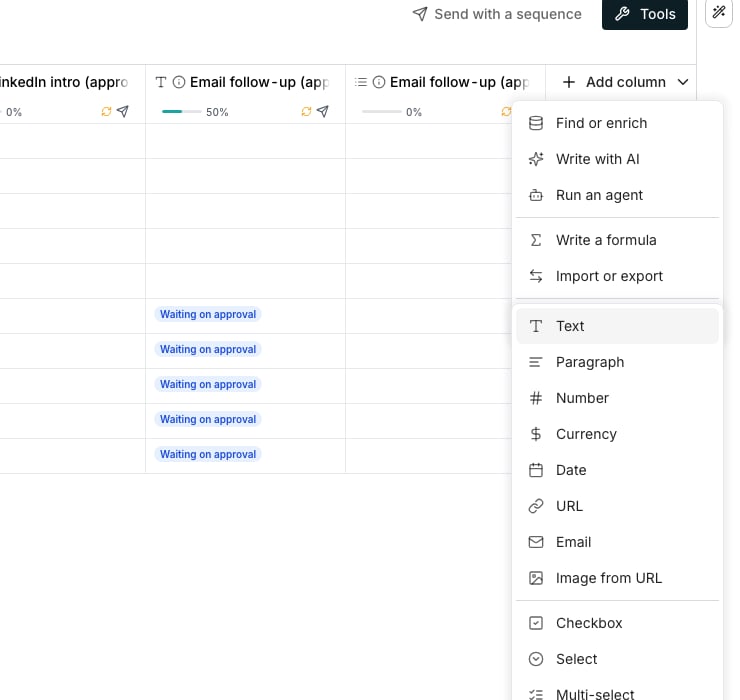
The Add column menu with its Type in values list open.
Pick a type
Click Add column and hover Type in values. The list shows the everyday value types first, then a line, then the types whose value is one choice from a set.- Text, Paragraph, Number, Currency, Date, URL, Email, Image from URL
- Checkbox, Select, Multi-select, Assigned to
Change a column’s type
Open the column’s header menu, hover Change type and pick a new type. A value the new type can still hold stays as it is. One it cannot hold, like text switched to Number, goes blank instead. When the change would clear values, a confirmation says how many first. Click Change type to go ahead; cleared values cannot be brought back.Good to know
Why doesn't the picker offer Decimal, List or Object?
Why doesn't the picker offer Decimal, List or Object?
They still exist. A column arriving from an import or an API can be one of them, and it displays and edits normally. The picker leaves them out of a column you build by hand, since Currency already covers the everyday decimal case.
What happens to a default value when I change a column's type?
What happens to a default value when I change a column's type?
It only survives a change that keeps the same kind of value. Switching to a different kind, like Text to Number, clears the default so an old value never renders wrong on every empty cell.
Can I turn a field column into a formula or enrichment column?
Can I turn a field column into a formula or enrichment column?
No. A column’s kind is fixed once it exists. Add a new formula or enrichment column instead, and delete this one if you no longer need it.
Which types can hold a default value for new rows?
Which types can hold a default value for new rows?
Every plain type except Multi-select, Assigned to and Image from URL. Multi-select’s value is a list, not one item; Assigned to is an identity nobody should default; Image from URL has no picture to default to.
Next steps
Add a column
Open the catalog and create any kind of column.
Reference other columns
Point one column at another so it reads its value.