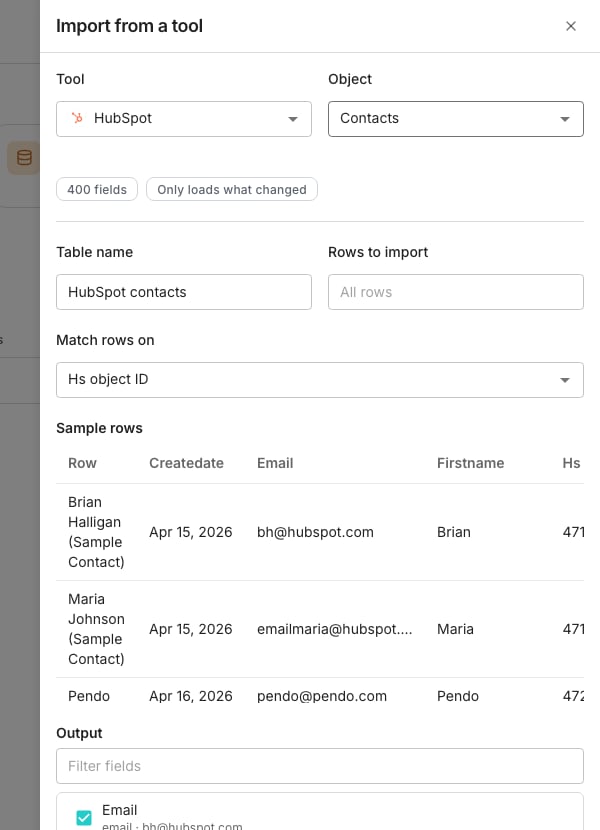
The import drawer, with a tool and an object picked.
Add rows from a connected tool
1
Open the drawer
On Tables, choose the Import from a tool card. You can also click New and pick the same item.
2
Pick a connection and an object
Choose a Tool, then an Object to bring in, such as contacts or companies.
3
Set it up and create the table
Work through the drawer’s fields below, then click Create table.
- Sample rows holds a few real rows pulled from that object. Every tool means something different by “contact”, so this is worth a look.
- Table name is filled in from the tool and the object. Change it to whatever you will recognise later.
- All rows brings in everything. Pick First and enter a number, such as 100, to bring in fewer.
- Match rows on picks the field a later refresh uses to find each row.
- Output decides which fields become their own columns.
If nothing is connected yet, the drawer shows Connect a tool instead. Search the directory and connect from there, without leaving the drawer.
Good to know
What does the Output section decide?
What does the Output section decide?
You keep the whole object either way. Checked fields also get a column of their own, and everything else stays one click away when you open the row.Oneprofile suggests a few fields and lists them first, already checked. Change them freely. A long field list gets a Filter fields box above it.
How does the table refresh later?
How does the table refresh later?
Once the sample rows arrive, a chip counts the fields the object carries. A second chip says how this object reloads.Only loads what changed means later runs bring in just the differences. Reloads everything each time means they bring in the whole object again.
Which field should I match rows on?
Which field should I match rows on?
Match rows on lists the ID fields the sample rows carry, with the tool’s own ID picked for you. Each option says how many sample rows have it and whether the tool can change it.A field the tool sets never changes, so it is the safe choice. If you match on a field people can edit, such as an email, changing it in the tool adds a new row.
Why can't an object be imported?
Why can't an object be imported?
Some objects carry no field to match rows on. The drawer says so and blocks the import, because a refresh could not tell which row to update. Pick a different object.
Why isn't a tool I just connected listed?
Why isn't a tool I just connected listed?
The drawer only lists tools it can pull rows from, so a connection of another kind never appears. It tells you when that has happened: “Your new tool can’t be imported from yet, so it isn’t listed here.”
Next steps
Connect a tool
Browse the directory and connect a tool.
Enrichment columns
Add work emails, phone numbers and company facts from outside sources.
Create a table
Every other way to start a table.