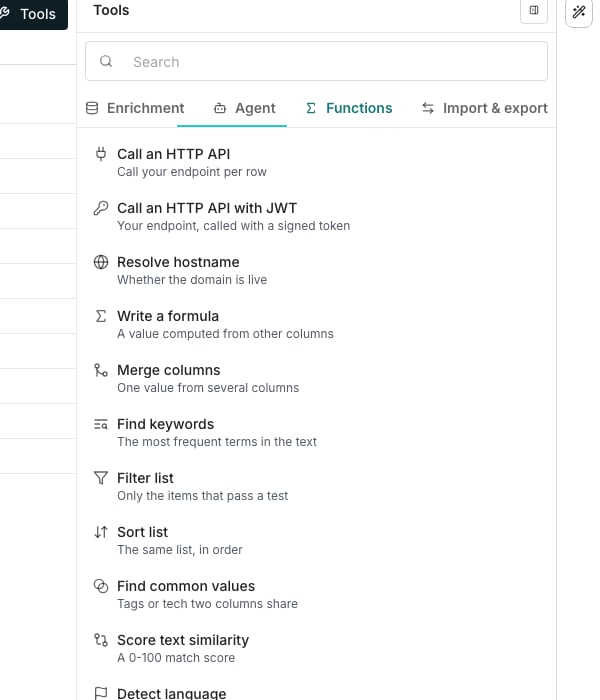
The Tools panel, open on the Functions tab.
Add a function column
1
Open the Functions tab
Click Tools above the grid, then the Functions tab. It is a flat list, not shelves.
2
Pick a function
Click Write a formula to build your own, or a named one like Merge columns or Find keywords to start from it.
3
Describe it, or build it by hand
Type what the column should compute and click Generate, or click Set up manually to assemble the steps yourself. A named function skips this choice and opens with its steps already filled in.
4
Check the preview
Each step picks a Function and a source column. The preview fills in as you edit, so you see real values before you commit.
5
Create the column
Click Create. It runs over every row straight away.
Function columns are free. Only enrichment and agent columns spend credits, so nothing here shows a price.
What you can compute
Write a formula chains steps together for anything custom. The named functions cover the common jobs. Text and lists: Merge columns, Find keywords, Filter list, Sort list, Find common values, Score text similarity, Detect language, Score words. Values and routing: Hash a value, URL-encode, Check URL, Guess email addresses, Assign round-robin, Assign weighted round-robin. Call an HTTP API and Call an HTTP API with JWT call your own endpoint once per row. Resolve hostname checks a domain answers before you spend on it.Good to know
What are the two ways to start a function column?
What are the two ways to start a function column?
Every function opens the same editor. Write a formula starts blank; a named function starts with its own steps already in place, which you can then change.
Will regenerating overwrite my edits?
Will regenerating overwrite my edits?
Once you have hand-edited the steps, asking AI Assistant to generate again warns you before it replaces your work.
Why was my prompt refused?
Why was my prompt refused?
Ask for something a function column cannot do, such as looking a fact up on the web, and AI Assistant says so rather than guessing. That is a job for an enrichment column or an agent column.
When does the preview run?
When does the preview run?
There is no preview button. The sample recomputes as you change a step, and an empty preview usually means a source column is empty rather than that the formula is wrong.
Can I create a column without running it?
Can I create a column without running it?
Create and don’t run, beside Create, saves the column and leaves its cells empty until you run it.
How do function errors show up?
How do function errors show up?
A row whose inputs do not suit the function shows an error in that cell, and the rest of the column still fills. Run conditions work here too, and without the usual cost warning, because there is no cost.
Next steps
Enrichment columns
Pull facts from outside sources instead.
Run columns
Decide when a column fills its cells.