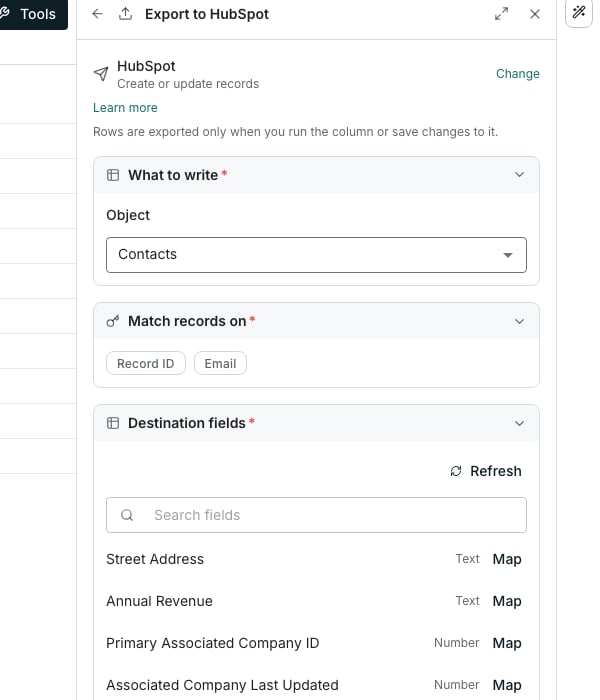
The export editor.
Set up an export
1
Pick the destination
Click Tools in the toolbar, then the Import & export tab. Click your connection under Integrations and choose its Export to option.
2
Choose what happens to records
Pick Create records, Update records or Create or update records. Each one is described below.
3
Choose the object
In What to write, pick the Object each row becomes. Oneprofile asks the connected tool what it holds.
4
Set the match fields
The card below it lists the fields the tool can match on, by the tool’s own names for them. Pick one or more, and point each at the column holding that value.
5
Map what you want to write
In Destination fields, click Map beside a field. Type a value into it, or type
/ to insert a column.6
Test it, then create the column
In Preview, click Test on these rows. It asks the tool what a real run would do and writes nothing, so click Create once the answers look right.
Create records
Adds new records only. A row already written once is skipped, never duplicated. Its match card is Prevent duplicates by. Map at least one field there, so a row already at the destination can be recognised before anything is created.Update records
Changes existing records only. A row with no match at the destination is skipped. Its match card is Find the record by. Map at least one field there. No match means no write, so nothing new is ever created by this action.Create or update records
Updates the matching record when one exists, and creates it when none does. Its match card is Match records on. Map at least one field there. A row that matches updates its record, and a row that matches nothing creates one.Good to know
How does matching on several fields work?
How does matching on several fields work?
When you pick more than one match field, each row uses the first of them it has a value for. It is not a stricter match built from all of them together.
Does an export ever run on its own?
Does an export ever run on its own?
Run it from the column’s run menu. An export column offers Push all rows and Push failed rows, each showing its row count, and the retry never re-pushes rows that already went through.
What does an update overwrite?
What does an update overwrite?
When a record matches holds Write mode, which offers up to three settings, as many as the tool supports.
- Change mapped fields only leaves the fields you have not mapped exactly as they are, and is the recommended setting
- Replace the whole record clears them
- Fill empty fields only leaves a field alone when it already has a value
Why can't I write to some fields?
Why can't I write to some fields?
A field the tool will not accept writes for is marked Read only and cannot be mapped. Refresh re-asks the tool for its field list. The browse button under Search fields carries the field count, and shows the ones you have not mapped yet.
What if the field I want isn't listed?
What if the field I want isn't listed?
An export writes only to fields the tool already has, and it never creates one. Add the field in the tool first, such as a custom property in your CRM, then click Refresh so it appears under Destination fields.
What does the word beside each field mean?
What does the word beside each field mean?
It is the field’s type, such as Text, Number or Date and time. Each field goes by the name the tool gives it, and the connection’s Data tab uses the same names and types.
How do I try an export safely?
How do I try an export safely?
Once the column exists, Sandbox offers Create sandbox copy, which opens a copy of the table in a new tab. Nothing in the copy merges back, so it is safe to push from.
Can I send rows in batches?
Can I send rows in batches?
Batching offers Send rows in batches, which writes several rows per request instead of one at a time.
How are retries, timeouts and rate limits handled?
How are retries, timeouts and rate limits handled?
Reliability holds Skip unchanged rows, which leaves out a row whose values are the same as the last time it was pushed. Under it sit Retry failed rows with a Max retries count, a Timeout in seconds, and a Rate limit in requests per minute. The defaults suit most destinations, and the tool’s own answer is honoured whatever you set.
What if nothing is connected yet?
What if nothing is connected yet?
The tool picker says No connected tools yet and offers Connect a tool, which opens Connections in a new tab. Your half-built column is still there when you come back.
Next steps
Connect a tool
Connect the tool you want to push rows into.
Run columns
Decide when a column runs, and over which rows.