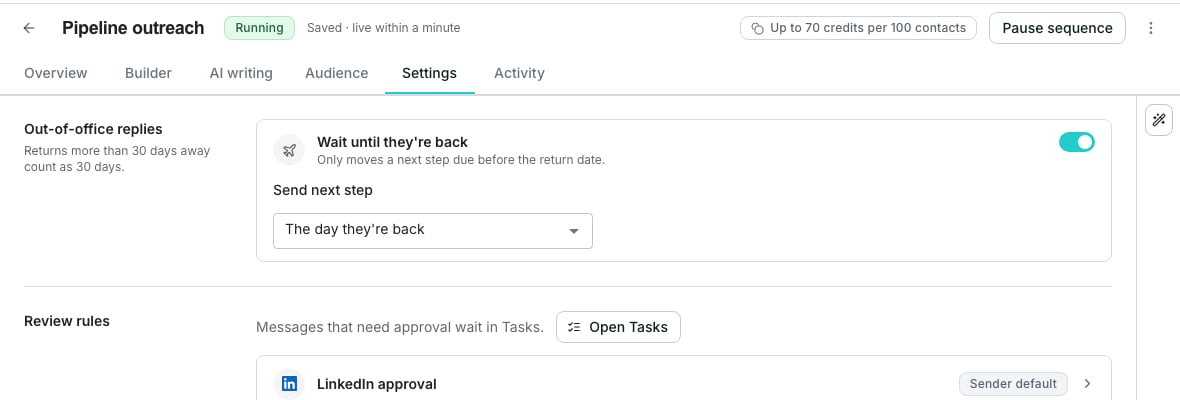
The Out-of-office replies section of a sequence's Settings tab.
Choose when the next step goes
Open a sequence from Sequences and go to its Settings tab. The Out-of-office replies section holds two controls:- Wait until they’re back is on for every sequence. Turn it off and the cadence carries on as planned.
- Send next step picks The day they’re back, or 1 to 5 business days after it.
Know which steps move
Only a next step due before they’re back moves. A step already due later keeps its date.- A return more than 30 days away counts as 30 days.
- A reply naming no date waits 7 days.
- Every sequence the contact is in waits, if its setting is on.
- Email and LinkedIn steps wait alike.
See who is away
On the Audience tab, a waiting contact reads Out of office, and the Next step column shows when it goes. A banner above the list says “Contacts are out of office.” Choose Resume all 3, counted for your sequence, to send to them now.Good to know
Why didn't the next step move?
Why didn't the next step move?
It was already due after their return, or the sequence’s Wait until they’re back is off. A step already in a sender’s LinkedIn queue, or waiting for approval in Tasks, also keeps its place.The reply must also be read as an out-of-office reply. Check that its conversation carries the Out of office label in the Inbox.
What counts as a business day?
What counts as a business day?
Monday to Friday. Public holidays are not skipped, so a step set for one business day after a Friday return goes on Monday.
Which timezone is the return day read in?
Which timezone is the return day read in?
The one the sending window reads its hours in for that contact’s sender. With no sending hours set, the step goes at 9:00 in the morning in the window’s timezone.
What happens if I turn the setting off?
What happens if I turn the setting off?
Later out-of-office replies leave the cadence alone. Contacts already waiting keep their new date. Choose Resume all 3 on the Audience tab to send to them now.
What if they write back before the date?
What if they write back before the date?
A reply from the contact themselves stops their follow-ups, as any reply does. Read it in the Inbox.
Can the AI Assistant change this?
Can the AI Assistant change this?
Yes. Ask it to stop waiting for out-of-office contacts, or to send two business days after they’re back, and it shows the change for you to approve.
Next steps
Reply with AI
What each kind of reply does to a contact’s follow-ups.
Schedule and sending window
The hours and days a sequence sends in.