> ## Documentation Index
> Fetch the complete documentation index at: https://docs.getoneprofile.ai/llms.txt
> Use this file to discover all available pages before exploring further.
# Table settings
> Rename a table, write its description, set how columns run, and choose what counts as a duplicate.
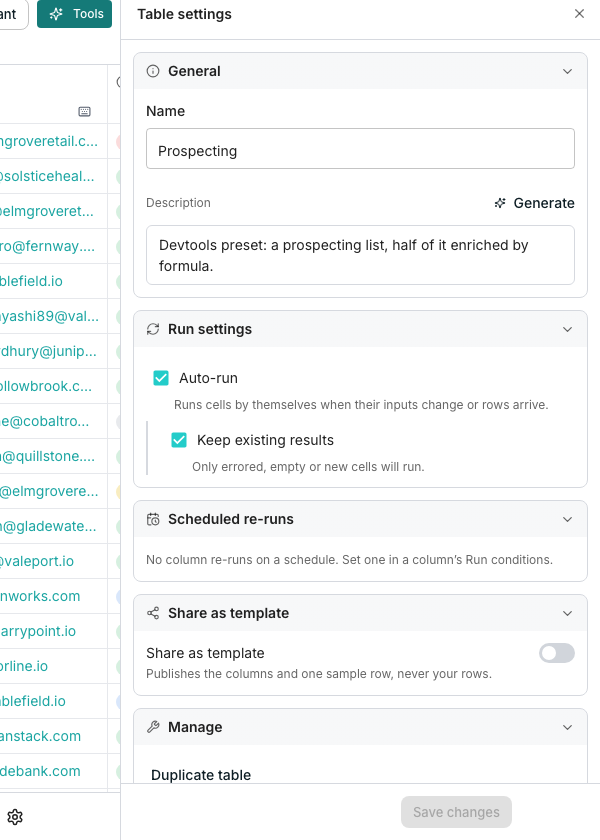
Table settings put every table-wide control in one panel: name, description, how columns run, and whether the table is public. Click **Table settings** at the bottom of the grid to open it.
 ## What's in the panel
* **General**, for the table's name and description
* **Run settings**, for **Auto-run** and **Keep existing results**
* **Scheduled re-runs**, a read only list of columns refreshing on their own
* **Deduplication**, to remove duplicate rows by one column's value
* **Share as template**, to publish the table's columns as a public link
* **Manage**, to duplicate or delete the table
## Set how columns run
Turn on **Auto-run** so columns fill their cells by themselves when inputs change or rows arrive. Turn on **Keep existing results**, underneath it, so a run only touches cells that errored, are empty, or are new.
## Manage the table
**Duplicate table** copies it with rows, and **Duplicate structure only** copies just its columns. **Delete table** moves it to Trash.
## Good to know
It sets the table's default. A column can turn **Auto-run** off for itself from its own **Run conditions**.
No. **Scheduled re-runs** only reports what is already set. Open the column's own **Run conditions** to change it.
No. It is a one time cleanup you trigger yourself, not a rule that catches every row that arrives afterward.
No. **Delete table** moves it to Trash, where it can still be restored.
## Next steps
Set the schedules this panel lists.
See what a signed out visitor sees, and how to revoke a link.
Read the full walkthrough for removing duplicate rows.
## What's in the panel
* **General**, for the table's name and description
* **Run settings**, for **Auto-run** and **Keep existing results**
* **Scheduled re-runs**, a read only list of columns refreshing on their own
* **Deduplication**, to remove duplicate rows by one column's value
* **Share as template**, to publish the table's columns as a public link
* **Manage**, to duplicate or delete the table
## Set how columns run
Turn on **Auto-run** so columns fill their cells by themselves when inputs change or rows arrive. Turn on **Keep existing results**, underneath it, so a run only touches cells that errored, are empty, or are new.
## Manage the table
**Duplicate table** copies it with rows, and **Duplicate structure only** copies just its columns. **Delete table** moves it to Trash.
## Good to know
It sets the table's default. A column can turn **Auto-run** off for itself from its own **Run conditions**.
No. **Scheduled re-runs** only reports what is already set. Open the column's own **Run conditions** to change it.
No. It is a one time cleanup you trigger yourself, not a rule that catches every row that arrives afterward.
No. **Delete table** moves it to Trash, where it can still be restored.
## Next steps
Set the schedules this panel lists.
See what a signed out visitor sees, and how to revoke a link.
Read the full walkthrough for removing duplicate rows.