> ## Documentation Index
> Fetch the complete documentation index at: https://docs.getoneprofile.ai/llms.txt
> Use this file to discover all available pages before exploring further.
# Share a table
> Publish a table as a link anyone can open, and take it back down when you are done.
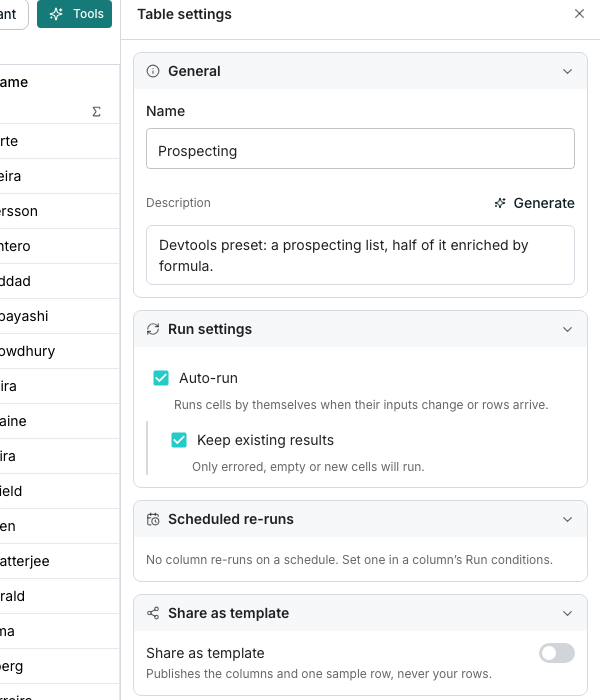
**Share as template** publishes a table's columns and one sample row as a public link, open to anyone who has it. Nothing else in the table leaves your workspace.
 ## Publish a table
In **Table settings**, turn on **Share as template**.
Copy the address shown under **Template link**. Anyone who opens it sees the table without signing in.
## What a visitor sees
A signed out visitor gets a plain page. It shows the table's name and description, then every column as a card naming its type, its kind, and one sample value. A line under the title states plainly that no data from the table is shared, only its shape.
## Take it down
Turn **Share as template** back off. The link stops working, and anyone who still has it sees a message that the template is no longer available.
## Good to know
No. **Share as template** reuses the same link each time, since it is built from the table's own address.
It is cut to a short preview, so one large text or object field never spills the whole card.
Yes. It loads fresh each time someone opens it, so a rename or a new column shows up without republishing anything.
Yes. Sharing is a switch on each table, so any number of your tables can be public at the same time.
## Next steps
Find every other table wide control in the same panel.
See what the grid itself shows your own team.
## Publish a table
In **Table settings**, turn on **Share as template**.
Copy the address shown under **Template link**. Anyone who opens it sees the table without signing in.
## What a visitor sees
A signed out visitor gets a plain page. It shows the table's name and description, then every column as a card naming its type, its kind, and one sample value. A line under the title states plainly that no data from the table is shared, only its shape.
## Take it down
Turn **Share as template** back off. The link stops working, and anyone who still has it sees a message that the template is no longer available.
## Good to know
No. **Share as template** reuses the same link each time, since it is built from the table's own address.
It is cut to a short preview, so one large text or object field never spills the whole card.
Yes. It loads fresh each time someone opens it, so a rename or a new column shows up without republishing anything.
Yes. Sharing is a switch on each table, so any number of your tables can be public at the same time.
## Next steps
Find every other table wide control in the same panel.
See what the grid itself shows your own team.