> ## Documentation Index
> Fetch the complete documentation index at: https://docs.getoneprofile.ai/llms.txt
> Use this file to discover all available pages before exploring further.
# Business context
> Tell Oneprofile what your company sells and who you sell to, and every AI feature writes better because of it.
Business context is what your agents, sequences and search draw on to write and reason like someone who knows your company. Fill it in once, by hand or with an auto-generated draft.
 ## Fill it in
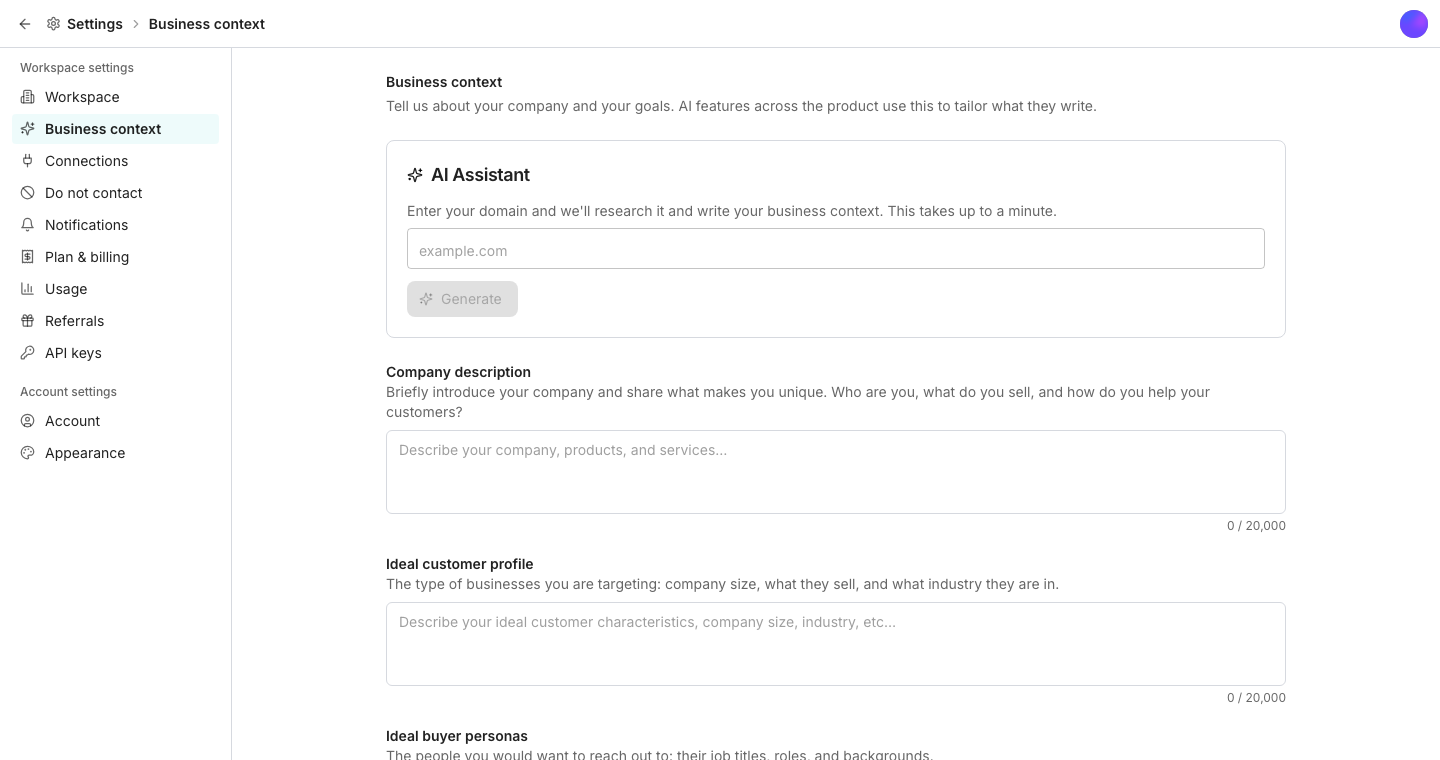
Write four sections yourself: **Company description**, **Ideal customer profile**, **Ideal buyer personas** and **Interest signals**. Or type your domain into the **AI Assistant** card and click **Generate** to have Oneprofile research it and draft all four for you.
Research and drafting takes about a minute.
Choose **Keep current** or **Use new**, section by section, then click **Apply**.
## Where it improves the product
An agent can fold this into every run, and a prompt can reference it directly with an @ mention. Enrichment columns can turn on **Use business context** to add it to a run. Sequence steps and AI replies write from it, and Find leads suggests searches based on it.
## Good to know
Not immediately. It shows what changed section by section, and you choose to keep the new version or your current text before anything saves.
Yes. Each of the four sections is a plain text box you can type into directly, with or without ever using Generate.
Oneprofile warns you and lets you save your own edits or load the newer version, rather than silently overwriting either one.
## Next steps
Reference your business context directly in an agent's prompt.
Write steps that draw on the same company context.
## Fill it in
Write four sections yourself: **Company description**, **Ideal customer profile**, **Ideal buyer personas** and **Interest signals**. Or type your domain into the **AI Assistant** card and click **Generate** to have Oneprofile research it and draft all four for you.
Research and drafting takes about a minute.
Choose **Keep current** or **Use new**, section by section, then click **Apply**.
## Where it improves the product
An agent can fold this into every run, and a prompt can reference it directly with an @ mention. Enrichment columns can turn on **Use business context** to add it to a run. Sequence steps and AI replies write from it, and Find leads suggests searches based on it.
## Good to know
Not immediately. It shows what changed section by section, and you choose to keep the new version or your current text before anything saves.
Yes. Each of the four sections is a plain text box you can type into directly, with or without ever using Generate.
Oneprofile warns you and lets you save your own edits or load the newer version, rather than silently overwriting either one.
## Next steps
Reference your business context directly in an agent's prompt.
Write steps that draw on the same company context.