> ## Documentation Index
> Fetch the complete documentation index at: https://docs.getoneprofile.ai/llms.txt
> Use this file to discover all available pages before exploring further.
# Set the schedule and sending window
> Decide which days and hours a sequence sends in, how fast it goes, and whether follow-ups go out before new contacts.
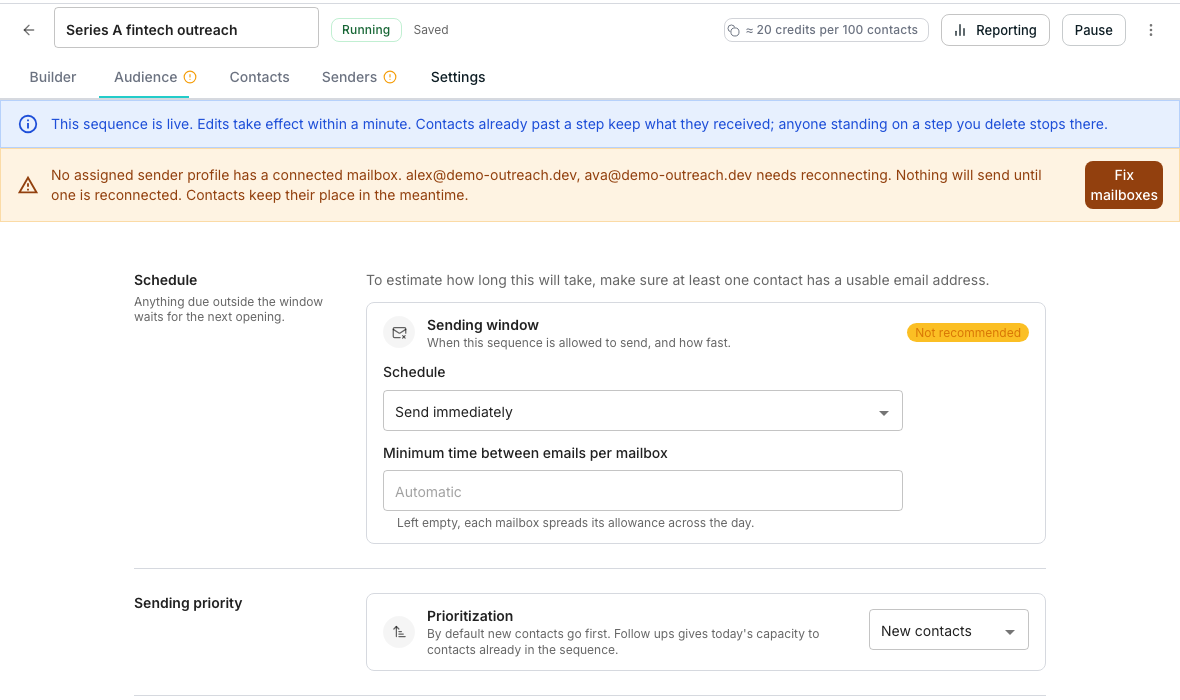
A sequence's settings decide which hours it can send in, how fast, and which of its contacts get today's capacity first. Anything due outside the window just waits for the next opening.
 ## Pick a sending window
In the sequence editor, open **Settings** and find the **Schedule** section.
Pick **Optimised for deliverability**, **Send immediately**, or **Custom schedule** from the **Schedule** dropdown.
Choose a **Timezone**, then tick each day's hours, or use **Weekdays 9-5** or **Every day 9-5** to set them all at once.
## Set the pace
**Minimum time between emails per mailbox** spaces out sends from one mailbox. Leave it blank and each mailbox spreads its allowance across the day; set a number and no mailbox sends twice inside that many minutes.
## Decide who gets today's capacity first
The **Sending priority** section's **Prioritization** control chooses between two contact groups. **New contacts**, the default, sends to fresh entrants first; **Follow ups** gives today's capacity to people already partway through the sequence instead.
## Good to know
It waits. The sequence sends it at the next hour the window allows, rather than dropping it.
It sends any day, any hour, as fast as each mailbox allows, which suits inbound replies and transactional mail more than cold outreach.
No. The days and hours stay the same; only the clock they run on changes.
It opens with a normal weekday, 9 to 5 window already set, so there is always something sensible to start from.
## Next steps
Cap how many people at the same company this sequence reaches.
Add steps and launch the sequence itself.
## Pick a sending window
In the sequence editor, open **Settings** and find the **Schedule** section.
Pick **Optimised for deliverability**, **Send immediately**, or **Custom schedule** from the **Schedule** dropdown.
Choose a **Timezone**, then tick each day's hours, or use **Weekdays 9-5** or **Every day 9-5** to set them all at once.
## Set the pace
**Minimum time between emails per mailbox** spaces out sends from one mailbox. Leave it blank and each mailbox spreads its allowance across the day; set a number and no mailbox sends twice inside that many minutes.
## Decide who gets today's capacity first
The **Sending priority** section's **Prioritization** control chooses between two contact groups. **New contacts**, the default, sends to fresh entrants first; **Follow ups** gives today's capacity to people already partway through the sequence instead.
## Good to know
It waits. The sequence sends it at the next hour the window allows, rather than dropping it.
It sends any day, any hour, as fast as each mailbox allows, which suits inbound replies and transactional mail more than cold outreach.
No. The days and hours stay the same; only the clock they run on changes.
It opens with a normal weekday, 9 to 5 window already set, so there is always something sensible to start from.
## Next steps
Cap how many people at the same company this sequence reaches.
Add steps and launch the sequence itself.