> ## Documentation Index
> Fetch the complete documentation index at: https://docs.getoneprofile.ai/llms.txt
> Use this file to discover all available pages before exploring further.
# Reply with AI
> Have a draft written for you, check it against the thread, and approve it before anything sends.
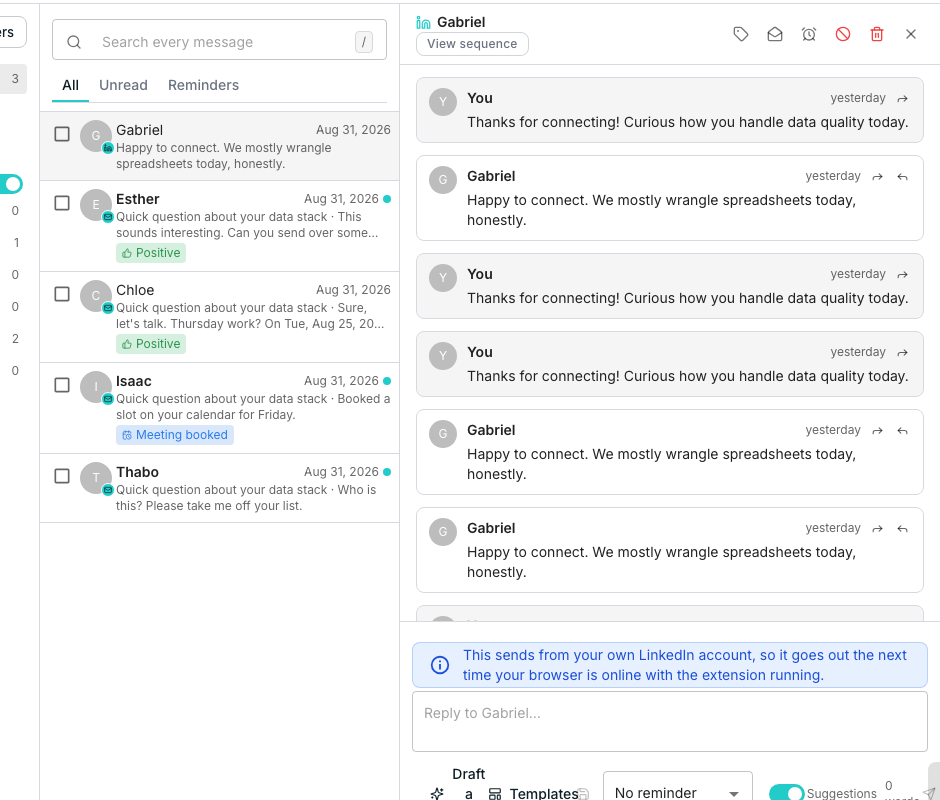
Reply with AI writes a draft reply from the thread, the sequence's goal and your business context. You read it, edit it if needed, and decide whether it sends.
 ## Generate and review a draft
Oneprofile reads the conversation, the sequence's goal and your business context, then writes a draft. Nothing sends yet.
A high score means the draft is ready to send as is. A lower one is worth a closer read first.
The draft is a plain text field. Change anything before you approve it, or click **Regenerate** and describe what to change instead.
## Approve, skip or discard
**Approve and send** sends the draft immediately with any edits you made. **Skip for now** keeps the draft and brings it back next time you open the thread. **Discard** deletes it, and rating a draft helps future ones.
A sequence set to auto-pilot can send a high-confidence draft on its own, without anyone clicking approve. Anything the model is unsure about still waits for a human.
## Set the goal and tone
A sequence's **AI replies** section, on its Settings tab, sets what each draft is trying to do. It offers a **Goal for this conversation**, **Tone**, **Language** and a **Call-to-action link**. **Reply mode** chooses between writing as a human, holding every draft for approval, or auto-pilot.
## Good to know
Only on auto-pilot, and only for a high-confidence draft on a healthy thread. After a handful of auto-sends on the same thread, it goes back to waiting for a human.
Oneprofile asks first, because regenerating writes over the draft on screen and your edits cannot be recovered.
Reply mode, language and tone fall back to a workspace default. Goal and the call-to-action link do not, so a thread outside any sequence gets a plainer draft.
Yes. **Save as template** keeps the wording for reuse on future replies.
## Next steps
Read and reply to every conversation a sequence starts.
Tell Oneprofile about your company so drafts write like you.
## Generate and review a draft
Oneprofile reads the conversation, the sequence's goal and your business context, then writes a draft. Nothing sends yet.
A high score means the draft is ready to send as is. A lower one is worth a closer read first.
The draft is a plain text field. Change anything before you approve it, or click **Regenerate** and describe what to change instead.
## Approve, skip or discard
**Approve and send** sends the draft immediately with any edits you made. **Skip for now** keeps the draft and brings it back next time you open the thread. **Discard** deletes it, and rating a draft helps future ones.
A sequence set to auto-pilot can send a high-confidence draft on its own, without anyone clicking approve. Anything the model is unsure about still waits for a human.
## Set the goal and tone
A sequence's **AI replies** section, on its Settings tab, sets what each draft is trying to do. It offers a **Goal for this conversation**, **Tone**, **Language** and a **Call-to-action link**. **Reply mode** chooses between writing as a human, holding every draft for approval, or auto-pilot.
## Good to know
Only on auto-pilot, and only for a high-confidence draft on a healthy thread. After a handful of auto-sends on the same thread, it goes back to waiting for a human.
Oneprofile asks first, because regenerating writes over the draft on screen and your edits cannot be recovered.
Reply mode, language and tone fall back to a workspace default. Goal and the call-to-action link do not, so a thread outside any sequence gets a plainer draft.
Yes. **Save as template** keeps the wording for reuse on future replies.
## Next steps
Read and reply to every conversation a sequence starts.
Tell Oneprofile about your company so drafts write like you.