> ## Documentation Index
> Fetch the complete documentation index at: https://docs.getoneprofile.ai/llms.txt
> Use this file to discover all available pages before exploring further.
# Email deliverability
> Keep your emails landing in the inbox with sending caps, schedules, plain text, and bounce alerts.
Deliverability is whether your emails reach the inbox or the spam folder. Oneprofile ships with safe defaults, and this page shows where each control lives.
 ## Keep sending inside the caps
Every mailbox carries a **Daily send limit**, set in its mailbox settings. The senders list shows **Emails today / daily cap** for each sender, so you can see headroom at a glance. A sequence never sends past a cap; it waits for the next day instead.
## Let the schedule pace your sends
A sequence's **Settings** tab has a **Schedule** section with a **Sending window**. Keep the **Optimised for deliverability** preset unless you have a reason not to. It spaces sends out like a person instead of a burst.
## Send plain text
The **Plain text (recommended)** toggle in sequence **Settings** sends your emails as text only. Formatted email is the louder spam signal, so leave it on for cold outreach.
## Watch bounce and reply rates
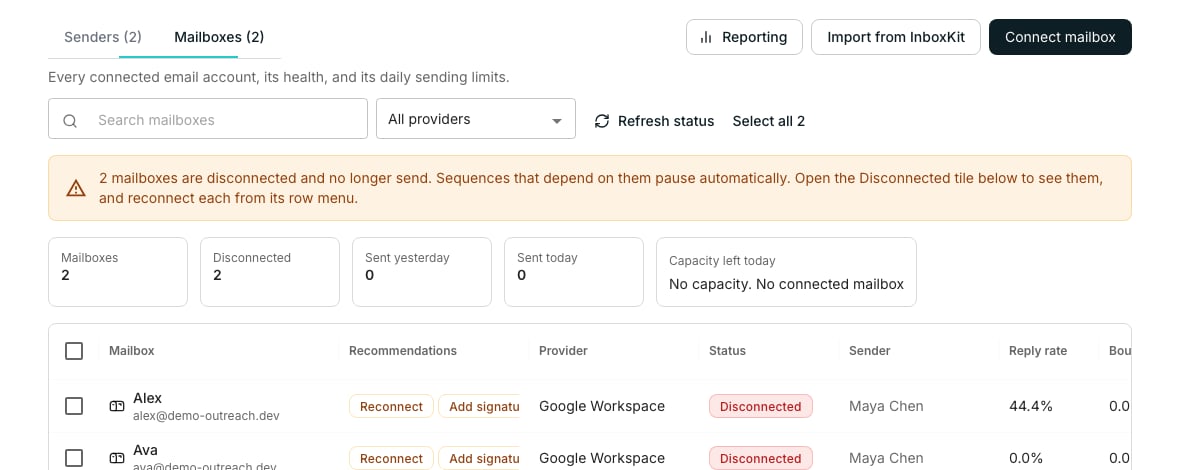
The **Mailboxes** tab shows **Bounce rate** and **Reply rate** per mailbox, and its **Recommendations** column flags what needs attention. A rising bounce rate is the earliest warning a list or mailbox is in trouble.
## Check your signature
Mailbox settings include a signature editor with a spam check beside it. It flags the phrases and patterns spam filters weigh, so run it after every edit.
## Good to know
You connect a mailbox that already exists, so authentication rides on its domain. Set up SPF, DKIM, and DMARC wherever that domain's DNS lives, usually your email provider's admin console.
It warms itself. A new mailbox ramps up on its own over its first days, so set the **Daily send limit** you actually want and let it climb to it.
Pause that mailbox's sending and look at the list it was sending to. Verified emails bounce far less, so re-run verification on the table before resuming.
It probably hit a daily cap and will resume tomorrow. Check **Emails today / daily cap** on the senders list.
## Next steps
Manage sender profiles and their daily activity.
Add the mailbox a sequence sends from.
Where the schedule and plain text settings live.
## Keep sending inside the caps
Every mailbox carries a **Daily send limit**, set in its mailbox settings. The senders list shows **Emails today / daily cap** for each sender, so you can see headroom at a glance. A sequence never sends past a cap; it waits for the next day instead.
## Let the schedule pace your sends
A sequence's **Settings** tab has a **Schedule** section with a **Sending window**. Keep the **Optimised for deliverability** preset unless you have a reason not to. It spaces sends out like a person instead of a burst.
## Send plain text
The **Plain text (recommended)** toggle in sequence **Settings** sends your emails as text only. Formatted email is the louder spam signal, so leave it on for cold outreach.
## Watch bounce and reply rates
The **Mailboxes** tab shows **Bounce rate** and **Reply rate** per mailbox, and its **Recommendations** column flags what needs attention. A rising bounce rate is the earliest warning a list or mailbox is in trouble.
## Check your signature
Mailbox settings include a signature editor with a spam check beside it. It flags the phrases and patterns spam filters weigh, so run it after every edit.
## Good to know
You connect a mailbox that already exists, so authentication rides on its domain. Set up SPF, DKIM, and DMARC wherever that domain's DNS lives, usually your email provider's admin console.
It warms itself. A new mailbox ramps up on its own over its first days, so set the **Daily send limit** you actually want and let it climb to it.
Pause that mailbox's sending and look at the list it was sending to. Verified emails bounce far less, so re-run verification on the table before resuming.
It probably hit a daily cap and will resume tomorrow. Check **Emails today / daily cap** on the senders list.
## Next steps
Manage sender profiles and their daily activity.
Add the mailbox a sequence sends from.
Where the schedule and plain text settings live.