> ## Documentation Index
> Fetch the complete documentation index at: https://docs.getoneprofile.ai/llms.txt
> Use this file to discover all available pages before exploring further.
# What you can enrich
> The shelves in the enrichment catalog, what each one returns, and what each one needs to work.
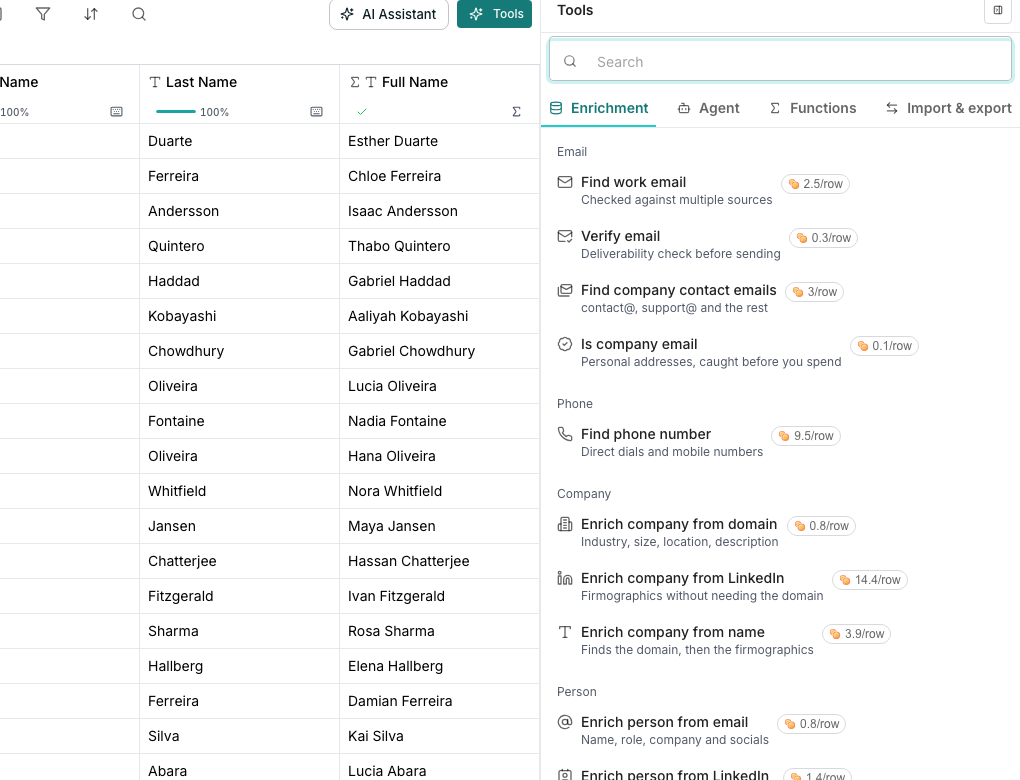
The enrichment catalog is organized into shelves by what they find, not how they find it. Open one to see every option that returns that fact.
 ## Browse the shelves
* **Email** finds or verifies a work address, from a name and company, an address to check, or a domain.
* **Phone** finds a number, from a name and company or a LinkedIn URL.
* **Company** fills in industry, headcount and location, from a domain, a name, or a LinkedIn URL.
* **Person** fills in job title, seniority and contact details, from an email, a LinkedIn URL, or a name and company.
* **Social profiles** finds a LinkedIn URL, from a name and company or a domain.
* **Relationships** finds who someone reports to, from an email or LinkedIn URL.
## Search the whole catalog
Typing in the search box looks across every shelf, not just the one you're on. If nothing matches, a pinned option offers to build the column with AI.
## Good to know
Enrichment sources are never named. A row is fulfilled by whichever of several sources answers first, so naming just one would misdescribe how it actually works.
It marks the cheaper of two rows that do the same job, and only when one is genuinely less expensive than the other. A tie, or a job only one row covers, gets no tag.
It appears only once your workspace has something enabled for it. Anything the shelves can't yet place is filed under a trailing More heading instead of disappearing.
## Next steps
How an address is found, and what each status means.
Read the cost before you run, and know what you're charged for.
## Browse the shelves
* **Email** finds or verifies a work address, from a name and company, an address to check, or a domain.
* **Phone** finds a number, from a name and company or a LinkedIn URL.
* **Company** fills in industry, headcount and location, from a domain, a name, or a LinkedIn URL.
* **Person** fills in job title, seniority and contact details, from an email, a LinkedIn URL, or a name and company.
* **Social profiles** finds a LinkedIn URL, from a name and company or a domain.
* **Relationships** finds who someone reports to, from an email or LinkedIn URL.
## Search the whole catalog
Typing in the search box looks across every shelf, not just the one you're on. If nothing matches, a pinned option offers to build the column with AI.
## Good to know
Enrichment sources are never named. A row is fulfilled by whichever of several sources answers first, so naming just one would misdescribe how it actually works.
It marks the cheaper of two rows that do the same job, and only when one is genuinely less expensive than the other. A tie, or a job only one row covers, gets no tag.
It appears only once your workspace has something enabled for it. Anything the shelves can't yet place is filed under a trailing More heading instead of disappearing.
## Next steps
How an address is found, and what each status means.
Read the cost before you run, and know what you're charged for.