> ## Documentation Index
> Fetch the complete documentation index at: https://docs.getoneprofile.ai/llms.txt
> Use this file to discover all available pages before exploring further.
# Improve your fill rate
> Better inputs fill more rows than more runs do. How to read a low fill bar and fix what is feeding it.
A low fill bar is almost always a missing input, not a broken enrichment. Fix what feeds a column before you run it again.
 ## Read the bar
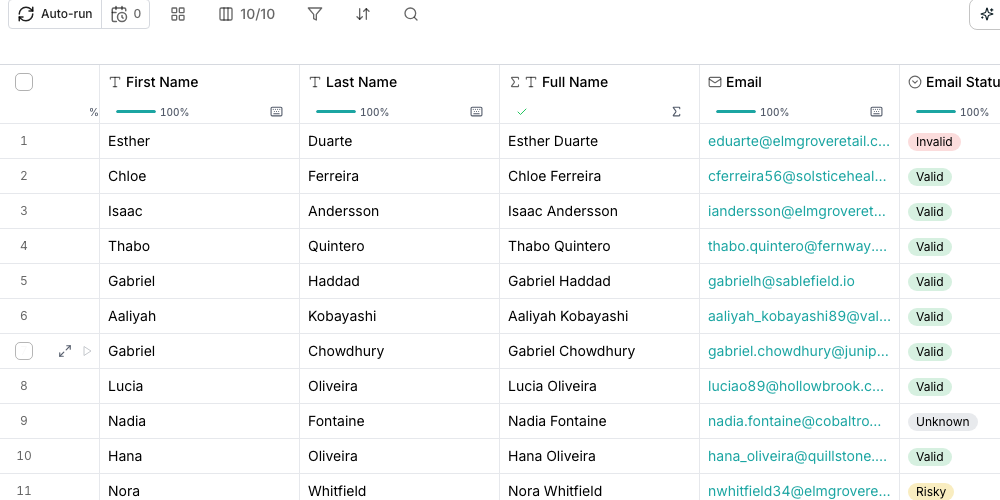
The strip under every header shows how much of the column holds a value; hover it for the exact count. A computed column shows a second, paler track for how much it has finished with.
## Fix what feeds it
Open the column's setup. A required input marked with an asterisk skips a row, for free, whenever that value is empty.
Run or fix whatever feeds the missing input, then run the enrichment again. It only skips rows that still lack it.
Some enrichments accept several inputs, like a name and company or a LinkedIn URL. Binding a second one gives rows missing the first a way in.
## Chain one enrichment into another
Bind an enrichment's input to a field another column already found, like a LinkedIn URL a search filled in. Oneprofile gives that field a column automatically when you save, so the second enrichment has something to read.
## Good to know
A missing required input isn't treated as an error. The row is skipped rather than charged, so a low fill rate here costs you nothing while you fix the input.
Not by itself. It only helps if the input the enrichment needs is now there. If the input is still missing, running again skips the same rows for free.
The bolder track is cells holding a value. The paler one is cells the column has finished with, whether they filled or not, so it is always the longer of the two.
## Next steps
See every shelf in the enrichment catalog.
Work through the causes in order, from inputs to balance.
## Read the bar
The strip under every header shows how much of the column holds a value; hover it for the exact count. A computed column shows a second, paler track for how much it has finished with.
## Fix what feeds it
Open the column's setup. A required input marked with an asterisk skips a row, for free, whenever that value is empty.
Run or fix whatever feeds the missing input, then run the enrichment again. It only skips rows that still lack it.
Some enrichments accept several inputs, like a name and company or a LinkedIn URL. Binding a second one gives rows missing the first a way in.
## Chain one enrichment into another
Bind an enrichment's input to a field another column already found, like a LinkedIn URL a search filled in. Oneprofile gives that field a column automatically when you save, so the second enrichment has something to read.
## Good to know
A missing required input isn't treated as an error. The row is skipped rather than charged, so a low fill rate here costs you nothing while you fix the input.
Not by itself. It only helps if the input the enrichment needs is now there. If the input is still missing, running again skips the same rows for free.
The bolder track is cells holding a value. The paler one is cells the column has finished with, whether they filled or not, so it is always the longer of the two.
## Next steps
See every shelf in the enrichment catalog.
Work through the causes in order, from inputs to balance.